

A RAID log is a single tracker for Risks, Assumptions, Issues, and Decisions (or Dependencies) that keeps owners, status, and next actions visible so problems get handled before they escalate. This article gives you a copy-ready template built on the same seven-column structure used by tools like a standard risk matrix, plus worked example rows from The Freelance PM Club that show exactly how each entry should read.
TL;DR:
- A RAID log should include specific risk, assumption, issue, and decision categories with clear owners, due dates, and status updates to ensure accountability and visibility.
- Review the RAID log weekly for small projects or align it with sprints, adjusting frequency based on risk exposure to prevent overlooked problems.
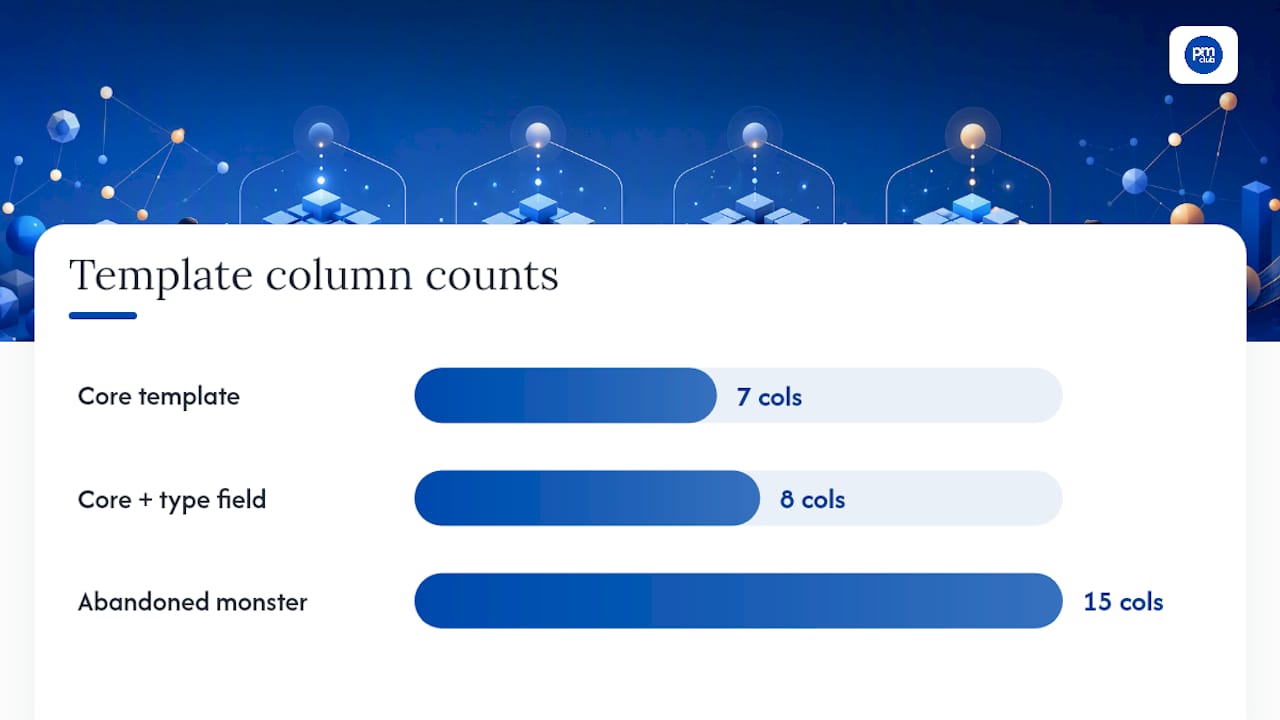
- Keep the template simple with seven core columns plus one type-specific field, avoiding overly complex structures that lead to neglect.
- A well-maintained log shows recent open items, low overdue percentages, and steady closures; climbing age and stagnation indicate neglect.
- Building the log is straightforward in Excel, but it requires discipline in updating, setting formulas for overdue and breach alerts, and sharing access with the team.
Table of Contents
- What Is a RAID Log and What Belongs in It?
- When Should You Start and Review a RAID Log?
- RAID Log vs. Risk Register: What's the Difference?
- Building a Practical RAID Log Template
- Worked RAID Log Examples You Can Copy
- How to Create and Maintain a RAID Log
- RAID Log Best Practices and Common Mistakes
- Excel Tips: Formulas That Make the Template Work
- Industry-Specific RAID Log Examples
- How RAID Logs Support Freelance PMs and Small Teams
- Get Templates and Coaching Through The Freelance PM Club
- Sources
- FAQ
What Is a RAID Log and What Belongs in It?
A Risk is something that might happen and could hurt the project. An Assumption is something you're treating as true without proof, usually because you need to keep moving. An Issue is a risk that already happened, or any current problem demanding a response. A Decision (sometimes framed as a Dependency) records a choice that was made, who made it, and what it depends on.
A RAID log tracks all four categories in one place so nothing gets buried in separate spreadsheets nobody checks. Every row, regardless of type, needs seven shared fields: an ID, the type, a short description, an owner, the date it was raised, the next action with a due date, and a status. Each field earns its spot. The ID lets you reference a row in an email without ambiguity. The owner field forces accountability instead of vague team ownership. The next-action-plus-date field is what turns a passive list into something people actually act on.
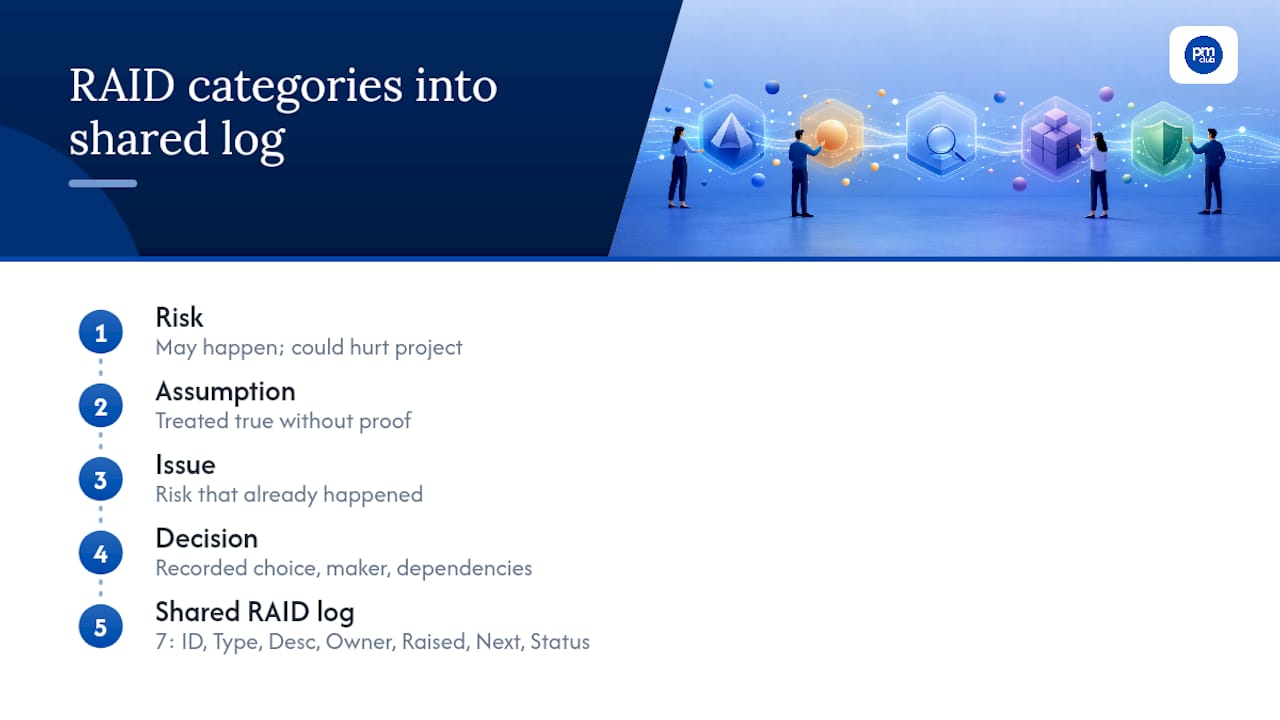
Running all four categories together, instead of four separate documents, gives a project sponsor one place to see how a risk you flagged in week two became the issue that delayed a deliverable in week six.
When Should You Start and Review a RAID Log?
Start the log at kickoff, before the first status meeting happens. Waiting until problems appear defeats the purpose. Early assumptions ("the client will provide brand assets by Friday") and early risks ("the developer is also staffed on another project") belong in the log from day one, even on a two-week freelance engagement.
Review cadence depends on project pace. Weekly review works for most consulting and freelance engagements. Teams running sprints often fold RAID review into the sprint review or retro, so it rides along with work that's already happening. Larger programs with milestone-driven delivery sometimes review monthly, with off-cycle updates triggered any time a risk materializes or a client makes a new commitment.
Match the cadence to risk exposure, not to convenience. A high-stakes migration project reviewing monthly is asking for trouble; a low-risk two-week audit reviewing weekly is probably overkill. Whatever you pick, put the review on the calendar as a recurring event, not a "when we remember" task.
RAID Log vs. Risk Register: What's the Difference?
A risk register only tracks risks, usually with more depth: probability scoring, impact quantification, mitigation cost, and sometimes a Monte Carlo simulation feeding into a program-level risk budget. A RAID log is broader but shallower: it combines risks with assumptions, issues, and decisions, so you can trace how a risk row connects to the issue or decision it eventually produced.
Separate risk registers still make sense for audited environments, regulated industries, or large programs where finance needs a quantified risk exposure figure for reporting. An issue log by itself works fine for support teams tracking tickets with no need to track assumptions or decisions.
Most freelance PMs and small teams don't need three separate documents. One RAID log, reviewed consistently, covers the ground a risk register and issue log would cover separately, without the overhead of reconciling three files that inevitably drift out of sync.
Building a Practical RAID Log Template
The core template needs exactly seven shared columns: ID, Type, Description, Owner, Raised Date, Next Action & Due Date, and Status. That's the whole skeleton. Everything else is optional.
Each row type benefits from one extra field:
- Risks get a Probability/Impact rating (High/Medium/Low works fine for most engagements).
- Assumptions get a "Validate By" date, the deadline for confirming the assumption is still true.
- Issues get an "Impact Now" field describing the current, active effect on the project.
- Decisions/Dependencies get a "Needed By" or "Committed By" date showing when the decision must land or when the committed date falls.
Here's the minimal structure in table form:
| Column | Purpose |
|---|---|
| ID | Unique reference (never reused, even after closure) |
| Type | Risk, Assumption, Issue, or Decision |
| Description | One sentence, focused on consequence |
| Owner | One named person, never a team |
| Raised Date | When the row was logged |
| Next Action & Due Date | The specific action and when it's due |
| Status | Open, In Progress, or Closed |
A few field rules make the difference between a log people trust and one they ignore. Assign a single named owner, never "the team" or "marketing," because shared ownership is how items rot for weeks. Prefix IDs by type (R-01, A-01, I-01, D-01) so anyone scanning the log knows the category at a glance, and never recycle an ID once a row closes. Write descriptions as one sentence focused on the consequence, not the cause. Keep status to three values only: Open, In Progress, Closed. More than three status options is how logs turn into guessing games about what "Pending Review" actually means.
Pro Tip: Build the template with only these seven columns plus one type-specific field. A shorter template that people actually fill out beats a 15-column monster that gets abandoned after week two.
Worked RAID Log Examples You Can Copy
Seeing the fields filled in matters more than reading about them. Here are four sample rows, one per RAID type, written the way a working log should look mid-project.
| ID | Type | Description | Owner | Raised | Next Action (Due) | Status |
|---|---|---|---|---|---|---|
| R-04 | Risk | Backend developer is also staffed on a competing client project, threatening the sprint deadline | Priya (PM) | March 3 | Confirm capacity with dev lead (March 10) | Open |
| A-03 | Assumption | Client will supply final logo files in vector format by March 15 | Client contact | March 5 | Validate file format received (March 15) | Open |
| I-07 | Issue | Homepage load time exceeds 4 seconds on mobile, failing the client's performance requirement | Dev lead | March 17 | Escalate to hosting vendor for CDN fix (March 20) | Escalated |
| D-03 | Decision | Team will use the client's existing analytics platform instead of migrating to a new one | Sponsor | March 13 | Document decision in scope note, notify stakeholders (Closed March 12) | Closed |
Notice R-04 and I-07 tell a mini-story: a flagged risk about developer capacity followed weeks later by an actual issue about site performance, tracked separately but visible in the same document. That's the log doing its job.
A few things make these rows well formed:
- Each description states a consequence, not just a fact ("threatening the sprint deadline," not just "developer is busy").
- Every owner is a named individual, not a department.
- Status moved from Open to Escalated on I-07 once the fix required outside help, which is exactly when status should change.
- D-03 shows a closed row that still carries a paper trail: what was decided, who decided it, and when.
How to Create and Maintain a RAID Log
Building the log is the easy part. Keeping it alive is where most teams fail. Follow this sequence:
- Define your categories. Confirm you're tracking all four types, not just risks, from the start.
- Build the template. Use the seven shared columns plus the one type-specific field for each row.
- Seed initial entries. Pull known risks and assumptions from the kickoff meeting or proposal before work begins.
- Assign owners immediately. No row goes live without a named person attached.
- Schedule recurring reviews. Put a weekly or sprint-aligned review on the calendar, not on a mental to-do list.
- Set escalation rules. Decide in advance what triggers moving a row from Open to Escalated (a missed due date, a client complaint, a budget threshold).
- Close rows deliberately. A closed row still needs a one-line resolution note, not just a status flip.
A RAID review meeting works best with a short, fixed agenda: scan overdue items first, discuss anything newly escalated, confirm next actions and dates for everything still open, then log any new risks or decisions surfaced during the conversation. Convert every discussion point into a next action with a date before the meeting ends. An item without a date is an item that gets forgotten.
Track a few simple metrics during review: average age of open rows, percentage of rows past due, and how many rows closed since the last review. These three numbers tell you fast whether the log is actually working or just accumulating.
RAID Log Best Practices and Common Mistakes
The habits that separate a log people trust from one they ignore are small but consistent.
Do this:
- Write consequence-focused descriptions in one sentence.
- Assign exactly one named owner per row.
- Enforce a due date on every next action, no exceptions.
Avoid this:
- Building a wide template with 15+ columns that nobody fills out consistently.
- Using more than three status values, which turns tracking into guesswork.
- Letting rows sit unreviewed for multiple cycles, which is the single fastest way a log becomes shelfware.
Single-source logging with clear ownership prevents the classic failure mode: three versions of the same list floating around in different inboxes, each slightly out of date.
Track average row age, percent overdue, and closure rate per review cycle. A healthy log typically shows most open rows under two review cycles old, a low percentage sitting overdue, and steady closures each time the team meets. When average age climbs and closure rate flatlines, that's the signal the log has stopped being a working document and started being a graveyard.
Excel Tips: Formulas That Make the Template Work
You don't need a dedicated tool to run a RAID log. Excel or Google Sheets handles it fine with a few formulas.
- Age formula:
=IF(Status="Closed","",TODAY()-[Raised Date])calculates days open and leaves the cell blank once a row closes, so closed rows don't skew your average age. - Overdue flag:
=IF(AND(Status<>"Closed",TODAY()>[Due Date]),"OVERDUE","")flags any open row past its due date instantly. - Assumption breach rule:
=IF(AND(Type="Assumption",TODAY()>[Validate By]),"BREACHED","")catches assumptions that were never confirmed by their validation date, a formula pattern that mirrors the Age and Overdue logic used across the rest of the sheet.
Add conditional formatting so overdue and breached rows turn red automatically. Freeze the header row so column labels stay visible while scrolling a long log. Set data validation on the Type and Status columns as dropdown lists, which stops typos like "closed" versus "Closed" from breaking your filters.
Store the log somewhere the whole team can reach without asking permission. A shared drive folder works for small teams; a PM tool with built-in version history works better once more than three or four people are editing regularly. Either way, name one person responsible for the master copy so you never end up with "RAID_log_FINAL_v3_actually final.xlsx."
Industry-Specific RAID Log Examples
The seven-column core stays the same everywhere. Most industry adaptations add exactly one field, not a redesign.
- Construction: Add a permit or inspection date field. A risk row like "concrete pour delayed pending city inspection approval" needs that date tracked alongside the standard fields.
- Technology: Add an environment or release field. An issue like "staging environment mismatch causing failed QA tests" gets clearer with a note on which environment it hit.
- Healthcare IT: Add a compliance-check date field. An assumption like "vendor will complete HIPAA compliance review before go-live" needs that validation date front and center.
- Marketing: Add an SLA or campaign-launch date field. A dependency like "media buy approval needed before ad spend locks" hinges entirely on that date.
Add one custom field, not five. If a project genuinely needs deep risk quantification (regulatory audits, large capital programs), keep a separate risk register alongside the lean RAID log rather than bloating the RAID template to cover both jobs. For small freelance engagements, keep the log to a single sheet and review it live with the client every week or two. Clients respond well to seeing their own commitments tracked next to yours.
How RAID Logs Support Freelance PMs and Small Teams
A lightweight RAID log does something bigger than tracking risk. It's proof, in writing, that you saw a problem coming before the client did. The Freelance PM Club builds its templates and coaching around that exact idea: tailor the log to the engagement size, not the other way around. A two-week audit doesn't need a 20-column monster. It needs four or five sharp rows reviewed with the client every Friday. Coaching helps freelancers cut templates down to what a specific client relationship actually requires, which tends to speed up adoption more than any downloadable file on its own.
— Ashanti
Get Templates and Coaching Through The Freelance PM Club
Building a RAID log from scratch works, but tailoring one to your specific client mix, industry, and reporting style takes more than a blank template. The Freelance PM Club gives freelance project managers a structured path: downloadable templates ready to adapt, plus coaching that helps you shape the log to how a specific client actually wants to see risk and status reported.

Membership through Freelancer Lite, Freelancer Pro, or Freelancer Elite unlocks the template library alongside course access and the community network, so you're not rebuilding your control documents for every new contract. If you want direct help tailoring a RAID log or your broader project controls to a specific engagement, one-on-one coaching walks through that with you. Check the subscription page to compare what each tier unlocks and select the one that fits where your freelance practice stands right now.
Sources
FAQ
What Is a RAID Log With an Example?
A RAID log is a single tracker for Risks, Assumptions, Issues, and Decisions, each row carrying an ID, owner, status, and next action with a due date. An example row might read: "I-07, Issue, homepage load time exceeds 4 seconds on mobile, Owner: Dev Lead, Status: Escalated, Next Action: escalate to hosting vendor by March 20."
What Should Be on a RAID Log?
Every row needs seven shared fields: ID, Type, Description, Owner, Raised Date, Next Action with a due date, and Status. Add one type-specific field per row, such as probability/impact for risks or a validation date for assumptions.
Does Excel Have a RAID Log Template?
Excel doesn't ship with a built-in RAID template, but you can build one in minutes using the seven-column structure and simple formulas for age and overdue tracking. Conditional formatting and dropdown data validation make it functional without any add-ins.
What Does a Healthy RAID Log Look Like?
A healthy log shows most open rows fairly recent, a small share of rows overdue, and steady closures every review cycle rather than a growing backlog. If average row age keeps climbing and few rows close, the log has stopped being reviewed properly.
How Much Does The Freelance PM Club Cost?
Membership pricing is listed on the subscriptions page, starting at $5 per month for Job Board Access, $10 per month for Freelancer Pro, and $20 per month for Freelancer Elite. Freelancer Lite and coaching pricing are available directly on the site.