

A complete project handover checklist has to move four things cleanly: deliverables, access, context, and formal sign-off. Miss anyone and the incoming owner inherits a mess disguised as a folder of files. Below you'll find the core checklist categories, a step-by-step timeline, copy-paste templates, and the live verification steps that separate a real transfer from a dump.
TL;DR:
- Thorough live testing of access transfers is essential, especially for accounts with two-factor authentication or IP restrictions, to prevent delays after handover.
- A clear, one-page overview and detailed tables like an access matrix and deliverable index streamline understanding of project scope, assets, and responsibilities.
- For software projects, the handover must include deployment keys, repository permissions, and current runbooks, while construction projects rely on physical documentation like drawings and warranty papers.
- Internal handovers often overlook process documentation and recurring tasks, which can cause support gaps or missed reports months later.
- Conducting structured, multi-phase handover meetings with verification, live task attempts, and written follow-up significantly reduces transition errors and support issues.
Table of Contents
- What Should Be in a Project Handover Checklist?
- Step-by-Step Handover Workflow and Timeline
- What Templates Should Go in a Handover Pack?
- How Does a Handover Checklist Change by Project Type?
- How Do You Run an Effective Handover Meeting?
- Sign-Off, Punch Lists, and Closing the Books
- How Do You Capture Lessons Learned After a Handover?
- Who's Behind This Guide, and What Else Can Help?
- Why Most Handover Failures Are Preventable, Not Bad Luck
- How The Freelance PM Club Makes Repeatable Handovers Easier
- Sources
- FAQ
What Should Be in a Project Handover Checklist?
A project handover checklist works only when it's organized by category, not by whatever the outgoing owner happens to remember first. Six categories cover almost every situation, whether you're closing out a client engagement or reassigning work internally.
Deliverables and status. List every final deliverable, where it lives, which version is the approved one, and who signed off on it. Vague file names like "final_v3" are how incoming owners end up shipping the wrong asset.
- File or asset name and current location (shared drive, repo, CRM record)
- Final version number and date approved
- Who approved it and where that approval is documented
Access and permissions. This is where most handovers quietly fail. Every account, tool, and system the project touches needs an owner, a transfer action, and a note on anything unusual like multi-factor authentication tied to a personal device.
- Account or system name, current owner, and new owner
- MFA method and whether it needs to be reset or reassigned
- Confirmation that the transfer action was completed, not just requested
Documentation and files. Master file locations, naming conventions, and version control rules need to be explicit rather than assumed. If the outgoing owner is the only one who knows that "the real spec" lives in a personal folder instead of the shared drive, that's a gap this checklist exists to close.
People and contacts. Every project has a shadow org chart of people who actually know things: backup contacts, vendors, subject matter experts, and whoever answers the phone when something breaks at 6 p.m. List names, roles, and escalation order.
Open items and risks. Unresolved tasks, known technical debt, and active blockers belong in writing, with an honest note on severity. According to StepCapture's handover guidance, transferring access and testing it live during the session is what catches the gaps a written list alone would miss.
Processes and recurring tasks. Standard operating procedures, their storage location, and how often each task runs (weekly report, monthly reconciliation, quarterly audit) round out the picture.
Pro Tip: Build the checklist as a living document from day one of the project, not a scramble two days before you leave. Retroactive handovers are where the important context gets forgotten.
Run a quick verification pass before you call any category "done": open every linked file, click into every account, and confirm dates match what's written down. A checklist that's accurate on paper but wrong in practice is worse than no checklist at all.
Step-by-Step Handover Workflow and Timeline
A handover isn't a single meeting. It's a sequence with distinct phases, and skipping a phase is usually why the "quick handover" turns into three weeks of confused Slack messages.
- Preparation, two or more weeks out. Define the scope of what's transferring and confirm who's receiving it. Start a working draft of the handover pack immediately rather than waiting for the final week. Monday.com's project closeout guidance specifically recommends keeping this draft editable, not locked into a PDF, so the incoming owner can flag gaps before it's too late.
- Validation, about one week out. The incoming owner should actively try to access every system on the list and read through the documentation, not just skim it. This is when knowledge transfer sessions begin, giving both sides time to fix problems before cutover.
- Shadowing and training, final days. Pair the incoming owner with the outgoing one on live tasks. Run actual tests, not walkthroughs where the outgoing person drives the whole time. The incoming owner should be doing the clicking.
- Cutover day. Verify every login works, transfer final approval authority, record formal sign-off, and set a defined support window (a week is common for moderate complexity, longer for anything with regulatory or client-facing risk).
- Closure. Reconcile finances, archive the full package centrally, and schedule a short post-handover review.
Access transfer is where the timeline usually breaks down, and it's almost always at the edge cases: two-factor authentication tied to a personal phone, shared service accounts nobody remembers creating, or IP-restricted admin consoles that only work from the old owner's office network. Build in time specifically for these during cutover rather than assuming standard password resets will cover it.
Testing access live matters more than most checklists admit. Permissions frequently look transferred in the admin panel but fail to actually propagate, and the only way to catch that is having the incoming person log in and try the task themselves, on the record, before the outgoing person walks away.

Pro Tip: Never schedule cutover for a Friday afternoon. If a login fails or a permission doesn't propagate, you want two business days of runway to fix it, not a weekend of silence.
What Templates Should Go in a Handover Pack?
A handover pack built from five concrete templates covers almost every scenario, and each one has a specific job.
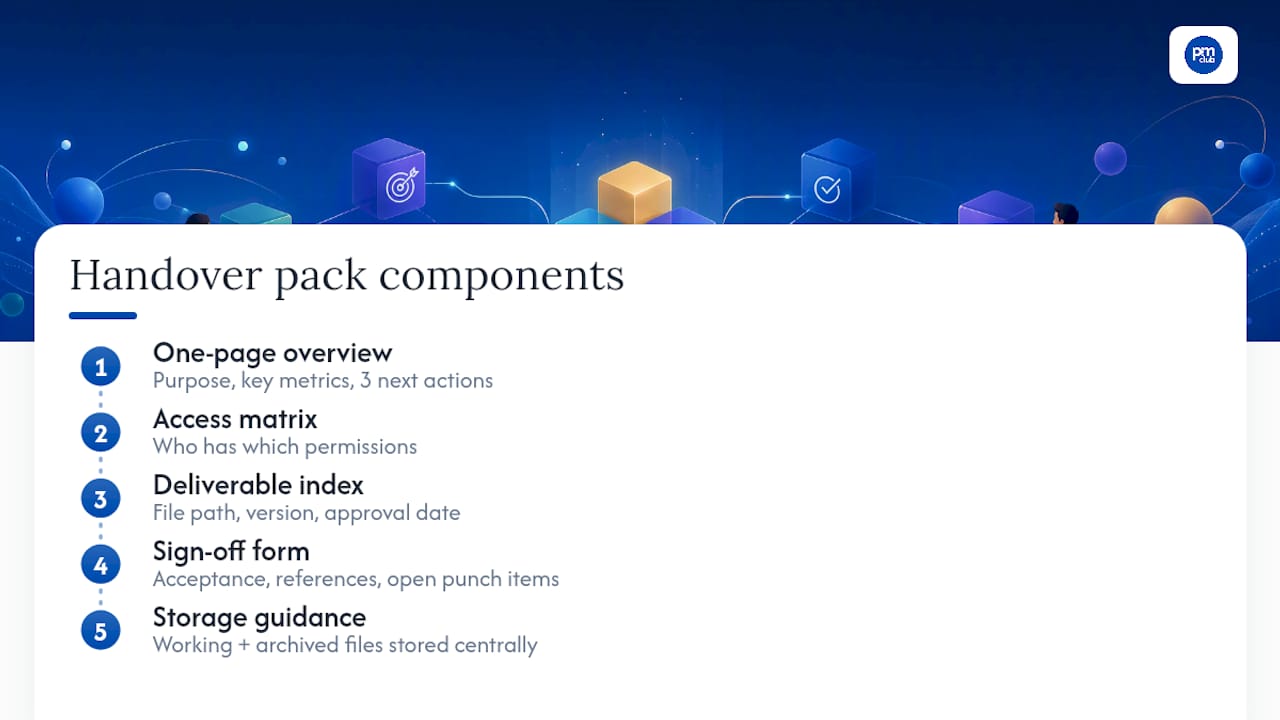
One-page overview. This is the executive summary: project purpose, scope boundaries, the two or three metrics that matter, and the three immediate next actions the incoming owner needs to take in week one. Anyone should be able to read this in ninety seconds and understand what they've inherited.
Access matrix. A simple table beats a bulleted list here because it forces you to fill in every column for every row.
Deliverable index. File path, final version number, and approval date, one row per deliverable. This is the difference between "I think that's the right file" and knowing for certain.
Sign-off form. This document records what's being accepted, references the original requirements or scope, and lists any punch items still open, each with a named owner and a deadline. Smartsheet's project handover templates collection includes scenario-specific versions worth starting from rather than building your own from scratch.
Storage guidance. Keep a working version and an archived final version, and store both centrally rather than in someone's personal inbox. A cloud folder with clear naming, plus a note in the project management tool pointing to it, is usually enough. The point of a handover document checklist isn't elegance. It's that a stranger could open it cold and know exactly what to do next.
How Does a Handover Checklist Change by Project Type?
The core categories stay the same across every project, but the specific items inside them shift hard depending on what you're handing off.
Software and web projects need a checklist heavy on technical access: repository permissions, deployment keys, monitoring dashboard logins, and current runbooks for common incidents. Include the status of user acceptance testing and any known bugs still in the backlog. Smartsheet's template library confirms this is one of the most requested variants, and for good reason. A missed deployment key can stall a release for days.
Construction projects run on physical documentation instead of digital access: as-built drawings, warranty documents, formal handover certificates, and a spare parts list for anything installed. This is closer to the classic project completion checklist model, where the final walkthrough and signed acceptance certificate carry legal weight.
Client handoffs need a polished final package, any software licenses being transferred, a training schedule for the client's team, and clearly stated service level agreement or maintenance terms going forward. This is the version most likely to double as a marketing touchpoint, so presentation matters more here than in an internal transfer.
Internal transfers (a PM leaving a role, a team reorganization) lean on standard operating procedures, recurring report schedules, calendar or meeting ownership, and a plan for reallocating the rest of the team's workload. These get skipped most often because nobody thinks of it as a "real" handover, which is exactly why gaps show up two months later when the recurring report doesn't get sent.
How Do You Run an Effective Handover Meeting?
The meeting is where most checklists either prove their worth or reveal that they were filled in carelessly. A file dump with a five-minute call attached is not a handover. A structured session with the right people in the room is.
- Set the agenda before the meeting, not during it. Cover deliverables status, open risks, access transfer, and a live Q&A block, in that order.
- Invite the right people. That means the outgoing owner, the incoming owner, key subject matter experts, and whoever holds final approval authority on the other side.
- Verify, don't just narrate. The incoming person should attempt a routine task themselves during the call: log into the dashboard, open the shared drive, pull up the client record. If it doesn't work live, it's not actually transferred.
- Match session length to complexity. Guidance from the UK Health and Safety Executive on shift handovers recommends a few minutes for routine updates, scaling up to longer sessions for more complex or high-risk transfers. A straightforward internal transfer might need fifteen minutes. A client handoff with contractual obligations attached deserves the full hour.
- Follow up in writing. Send a short recap within 24 hours confirming what was covered and what's still open.
Pro Tip: Keep the handover document in one central, editable file during the transition period rather than emailing new versions back and forth. Version control chaos during a handover is how the wrong file becomes the "official" one.
Combining written documentation with a verbal, two-way session isn't optional politeness. It's the only format that catches the context a document alone can't carry, like why a workaround exists or which client contact actually makes decisions versus who's copied on emails.
Sign-Off, Punch Lists, and Closing the Books
Formal acceptance isn't a formality. The University of Maryland's project closing guidance calls the sign-off document a project's legal legacy, and that framing holds up: it's the record that confirms deliverables met requirements and protects everyone involved if a dispute surfaces later.
A proper sign-off document, sometimes called a Deliverable Acceptance Form or Project Completion Certificate, should include:
- A clear reference back to the original scope or requirements document
- A list of what's being accepted, matched against the deliverable index
- Signatures (or verifiable digital approval) from both the accepting party and the delivering party
- Any punch-list items still open, each with a named owner and a firm deadline
Punch-list items don't disappear just because the project is technically closed. Document them explicitly, assign an owner, set a deadline, and define what "resolved" looks like so nobody argues about it later.
Financial closure runs in parallel: reconcile outstanding invoices, confirm final payments, and formally close any vendor contracts tied to the project. Asana's project closure framework treats this as one of several distinct steps rather than an afterthought bundled into "wrap-up," and treating it that way avoids the awkward invoice that surfaces three months after everyone's moved on.
Archive the full package (deliverables, sign-off form, access matrix, correspondence) somewhere central with a clear retention note. A year is a reasonable minimum for most projects; contractual or regulated work often demands longer.
How Do You Capture Lessons Learned After a Handover?
Run a short, timeboxed lessons-learned session within a week of cutover, while details are still fresh. Thirty minutes is usually enough for a small team; keep it outcome focused rather than a general debrief.
Ask three questions directly:
- What nearly got missed, and how did we catch it (or not)?
- Where did the checklist itself fall short?
- What's one change we make to the template before the next handover?
Update your master checklist immediately after the session rather than filing the feedback away for "someday." A NiftyPM's guidance on handover checklists suggests keeping one master template with short scenario-specific add-ons rather than maintaining separate checklists for every project type, which keeps the whole system easier to update and harder to let go stale.
Assign one person ownership of the master checklist going forward. Review it after any handover that revealed a gap, and do a lighter scheduled review every quarter even if nothing went wrong. A checklist that never changes is a checklist nobody's actually using.
Who's Behind This Guide, and What Else Can Help?
This guide draws on established project closeout frameworks and firsthand patterns freelance project managers run into repeatedly: the missing login, the punch-list item nobody owns, the file dump disguised as documentation.
The Freelance PM Club exists for exactly this kind of practical gap. Members get access to a library of templates (including handover packs and sign-off forms), career coaching, and an active community of freelance PMs trading real workflow fixes, not theory.
If you're building your own handover process from scratch, the Club's resource library and course content are built to shortcut that work rather than make you start over on every new engagement.
Why Most Handover Failures Are Preventable, Not Bad Luck
Most botched handovers I've seen described come down to the same root cause: the outgoing person assumed context that was never written down. A client's unwritten preference. A workaround nobody documented because "everyone just knows." A login that worked in testing but not in production.
Three things consistently separate the handovers that go smoothly from the ones that don't. First, testing access live during the session, not after, catches permission failures before they become outages. Second, distinguishing a true handover from a broader transition matters. Handing over files is not the same as ensuring the new owner is actually stabilized in the role, and treating them as identical is how support gaps happen. Third, writing down technical debt honestly, even the embarrassing parts, saves the incoming owner weeks of confused debugging.
Copy the structure here, but adapt the specifics. A checklist built for a six-week client engagement will feel bloated for a two-day internal handoff, and one built for internal use will feel thin for a client-facing transfer with contractual weight behind it.
— Ashanti
How The Freelance PM Club Makes Repeatable Handovers Easier
A repeatable system helps freelance PMs avoid rebuilding the same handover pack from scratch on every engagement. Having access to a library of templates, including handover packs, access matrices, and sign-off forms, allows customizing an existing structure rather than starting blank every time.

Beyond templates, career coaching is available to help work through specific friction points of client transitions, along with a community of freelance PMs sharing experience with edge cases such as access transfers and sign-off issues. For structured handover meetings or bid delivery packages that need to look sharp, BidBlock's proposal tools pair well with a solid handover process, and the 121 Group's approach to running strategy reviews is a useful model if you're building your own post-handover review cadence.
A repeatable checklist system reduces the time you spend rebuilding documentation and lowers the risk of a client relationship souring over a messy transition. Start by exploring The Freelance PM Club's membership options and see which template tier fits your current workload.
Sources
- Project Closure Template: Checklist + 7-Step Process — Asana
- Shift handover guidance — HSE
- The project closing checklist — University of Maryland (EP&M)
- Hand over documentation — StepCapture
- Free project handover templates — Smartsheet
FAQ
What Should Be Included in a Project Handover?
A complete handover includes deliverables with final versions and approval status, access and permissions with a verified transfer, documentation and process guides, key contacts, and a signed acceptance document covering any remaining punch-list items.
How Do You Build a Handover Checklist?
Organize items into categories (deliverables, access, documentation, people, open risks, processes), start the working draft at least two weeks before cutover, and verify every access point live during the handover session rather than assuming it transferred correctly.
What Does a Handover Sheet Look Like?
A handover sheet is typically a one-page overview covering project purpose, scope, key metrics, and immediate next actions, paired with supporting tables like an access matrix and a deliverable index. The Freelance PM Club's template library includes ready formats for this exact document.
What's the Checklist for a Software Project Handover?
A software handover checklist covers repository access and deployment keys, monitoring and alerting dashboard logins, current runbooks for known issues, and the status of any open user acceptance testing or unresolved bugs.
How Long Should a Handover Meeting Last?
Session length should scale with complexity: routine updates need only 5 to 10 minutes, while complex or high-risk transfers can require up to 60 minutes of structured, two-way briefing.