

Front-load your title and prove your delivery. Put your target role and top certification in your headline, back it up with one quantified result in your About section, pin your three strongest skills, and post once a week using a simple 3/2/1 rhythm. Everything else on your profile is decoration; those four moves are what actually move you into recruiter searches and client shortlists.
TL;DR:
- Using the target title plus certification and a clear outcome in your headline ensures visibility before recruiters even open your profile.
- Including specific, measurable results and methodology details in your Experience section helps recruiters quickly assess your impact and expertise.
- Posting regularly with a focus on leadership insights, tools, and lessons learned builds credibility and increases inbound engagement over time.
- Prioritizing specific keywords and certifications like PMP, Agile, or Jira in your profile boosts your chances of appearing in targeted searches.
- Regular profile tune-ups, including updating your headline, adding quantifiable achievements, and enhancing visuals, can significantly increase recruiter views.
Table of Contents
- Why LinkedIn For Project Managers Matters More Than a Resume
- How Do You Write a Headline and About Section Recruiters Notice?
- Which Skills and Keywords Should Project Managers Add?
- How Do You Showcase Projects and Measurable Outcomes?
- What Should Project Managers Post and How Often?
- Which LinkedIn Groups Actually Generate Leads for PMs?
- How Do You Track Progress and Improve Your Profile Fast?
- How Should You Use the Featured Section as a Project Manager?
- How Do You Request Recommendations That Actually Help?
- What Makes a Good Profile Photo and Banner for a PM?
- How Do You Use LinkedIn Job Search and Alerts for PM Roles?
- How Can LinkedIn Learning Support Your PM Career Growth?
- What I Would Tell a Project Manager Starting From Zero
- How The Freelance PM Club Helps You Move Faster on LinkedIn
- Sources
Why LinkedIn For Project Managers Matters More Than a Resume
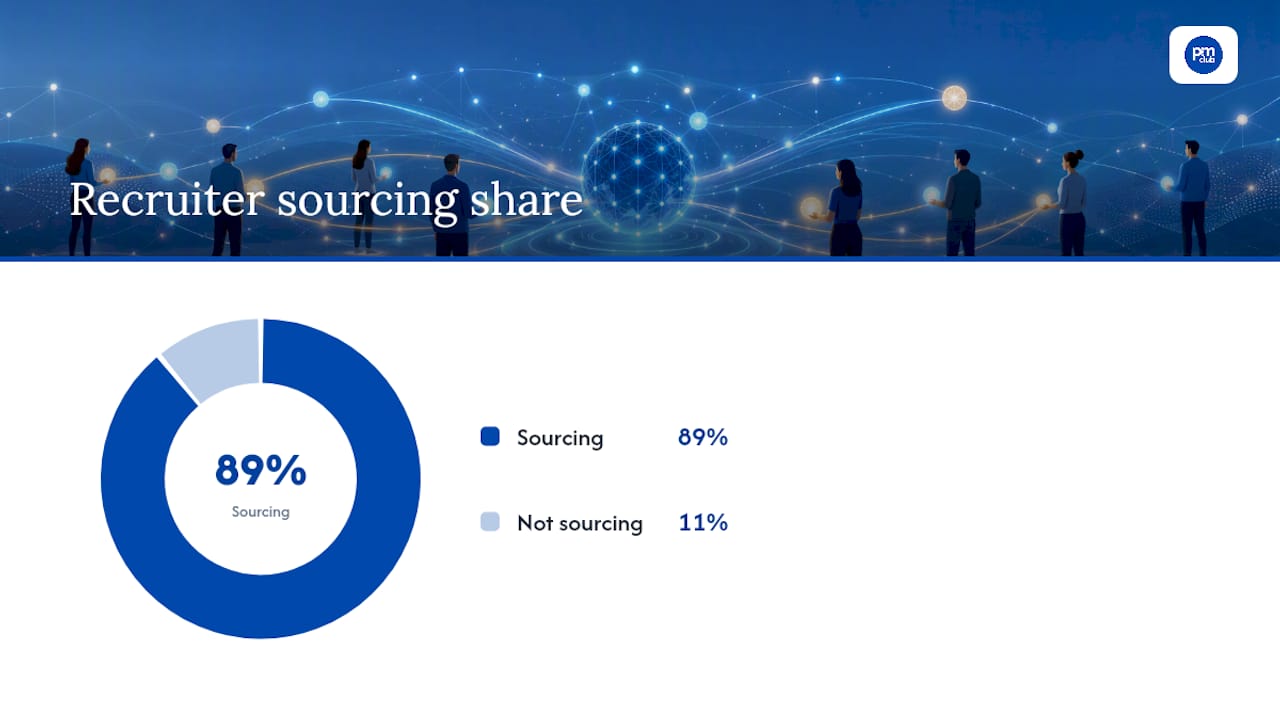
Recruiters aren't scanning resumes first anymore. Roughly 89% of recruiters source candidates directly on LinkedIn, and the platform processes about six hires every minute. That means your profile is competing in real time against thousands of other PMs, and the ones who win aren't necessarily more qualified. They're just easier to find and faster to evaluate.
A resume gets read after someone already decided to consider you. A LinkedIn profile is what gets you considered in the first place, whether that's a recruiter running a Boolean search for "PMP" and "Agile," or a potential client scanning your posts before a discovery call. Project managers have a specific problem here: the work is often invisible by design. You made a $2 million rollout look boring because nothing broke. LinkedIn is where you finally get to show your hand.
How Do You Write a Headline and About Section Recruiters Notice?
Your headline is prime real estate, and most PMs waste it. LinkedIn allows 220 characters in the headline field, but only the first 40 to 50 characters show up in mobile search results, which is where most recruiters are scrolling. If your headline opens with "Passionate about driving results," you've already lost the click.
Use this formula instead: Target Title | Certification/Methodology · Niche or Outcome. For example: "Senior Project Manager | PMP, CSM · SaaS Implementations, $5M+ Budgets." Everything a recruiter needs to qualify you is visible before they even open your profile.
Your About section does the proving. Structure it in three moves:
- Opener: who you are and what you specialize in, stated plainly, no adjectives doing the work of facts.
- Delivery evidence: one quantified result. Budget managed, team size led, percentage saved or accelerated.
- Scope and call to action: industries you've worked in, team sizes you're used to, and what you're open to next (contract work, full-time, consulting).
LinkedIn's own profile guidance treats this section as proof-of-delivery space, not a personality showcase. A weak version says: "Experienced PM with a track record of success." A strong version says: "Led cross-functional teams of up to 14 to deliver enterprise software rollouts on time and under budget, including a $3.2M ERP migration completed six weeks early." One of those gets skimmed and forgotten. The other gets a message.
Statistic Callout: With 89% of recruiters actively sourcing on LinkedIn, a headline that buries your title past character 50 is invisible to most of the people searching for exactly what you do.
Which Skills and Keywords Should Project Managers Add?
LinkedIn's search algorithm and most applicant tracking systems both hunt for exact-match keywords, not synonyms. If a recruiter searches "Agile" and your profile only says "flexible methodologies," you don't show up.
Prioritize these across your headline, About, and Experience sections:
- Project Manager (your actual title, not a euphemism)
- Project planning and scheduling
- Risk management
- Stakeholder communication
- Agile and Waterfall (list both if you've worked in either)
- Jira, Asana, or whatever platforms you've actually used
- Budgeting and cost control
Many PM candidates get filtered out early simply because they skip methodology acronyms like PMP, CSM, or SAFe in their headline and skills section. If you're certified, name it. Twice, if it fits naturally.
Pin your top three skills to the top of your Skills section, then ask two or three former colleagues to endorse those specific ones rather than a scattershot list of twenty. Mirror language from job postings you're targeting, but don't paste in every buzzword from a listing. A profile stuffed with keywords reads as desperate, not qualified.
Pro Tip: Open three job postings for roles you want and highlight every repeated skill word. Those repeats are your keyword list, not a generic "top skills" article.
How Do You Showcase Projects and Measurable Outcomes?
Every bullet in your Experience section should follow one pattern: context, action, measurable outcome. "Managed a team" tells a recruiter nothing.
Profile templates built around this structure consistently perform better because they let a recruiter assess you in seconds, not minutes.
Run this checklist on one role entry right now:
- Does the first line state scope (budget, team size, or industry)?
- Does at least one bullet include a number, not just an adjective?
- Have you named the methodology used (Agile sprints, PRINCE2 stage gates, Waterfall phases)?
- Is there a measurable end state (percentage saved, timeline beaten, revenue protected)?
- Could a stranger understand what changed because you were there?
Where confidentiality allows, attach a project one-pager, a case study post, or a client recommendation directly under that role. A recommendation from a stakeholder who lived through the project does more to validate a claim than any adjective you could write yourself.
What Should Project Managers Post and How Often?
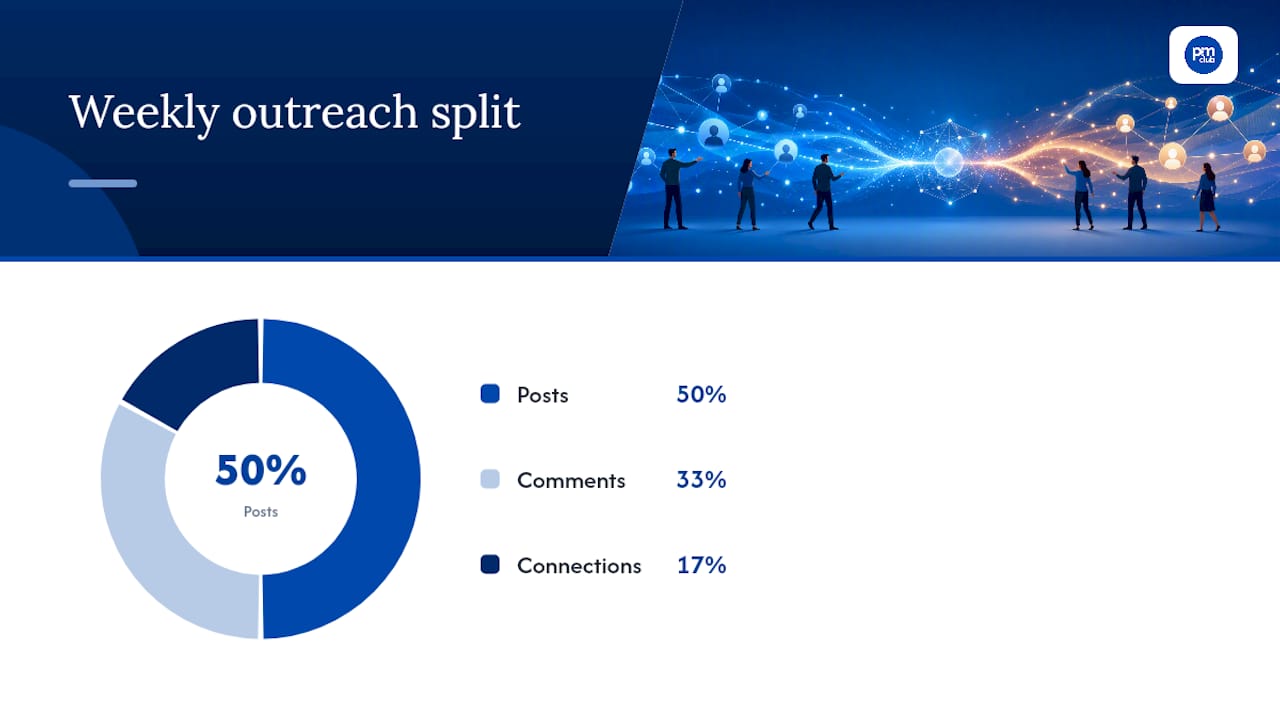
Visibility on LinkedIn compounds slowly, then all at once. The routine that works for busy PMs is the 3/2/1 rule: three posts a week, two comments on other people's posts, one new connection request, all deliberate rather than random.
Structure your three weekly posts around rotating pillars:
- A leadership insight. How you handled a stalled stakeholder, a scope fight, or a budget cut. No names, no client details.
- A framework or tool tip. A RACI matrix breakdown, a risk register template, a five-minute status update format.
- An anonymized lesson learned. What went wrong on a project and what you'd change, stripped of any identifying detail.
Given that project management runs on roughly 80% communication and 20% mechanics, your posts should skew toward how you led people, not just which software you used. A carousel of a non-sensitive process diagram beats a wall of text every time; people stop scrolling for visuals.
Comment before you connect. A specific, useful comment on someone's post is a warmer introduction than a blank connection request, and it gives you a natural reason to follow up by direct message a few days later.
Pro Tip: Keep a running list of three "anonymized lessons learned" from closed projects. You'll never run out of content, and you'll never risk a confidentiality breach.
Which LinkedIn Groups Actually Generate Leads for PMs?
Not all groups are worth your time, and most PMs join a dozen and never open one again. Prioritize three types:
- Large general PM networks. Broad reach, useful for visibility and job alerts.
- PMI local chapters and certification-specific groups. Smaller, but members here are actively hiring or referring.
- Niche industry groups (construction PM, healthcare IT delivery, SaaS implementation) where your specific experience stands out instead of blending in.
Group sizes on LinkedIn range from roughly 39,000 members to over 800,000, and size isn't the deciding factor. Check post frequency and comment activity in the last week before joining. A 40,000-member group with daily discussion beats an 800,000-member group that's gone silent.
Build credibility with short, specific value-add posts and free templates rather than self-promotion. Track which group interactions turn into actual direct messages or inquiries; that's the only metric that tells you if a group is worth your continued attention.
How Do You Track Progress and Improve Your Profile Fast?
Five numbers tell you whether your profile is working: profile views, recruiter-specific views (visible with Premium), inbound messages, engagement rate per post, and connection accept rate. If none of these move over a month, something upstream is broken, usually the headline or the missing metric in About.
Run this 60-minute tune-up in one sitting:
- Swap your profile photo and banner if either looks dated or unprofessional.
- Rewrite your headline using the title-plus-certification formula.
- Add one quantified result to your About section opener.
- Pin your top three skills and request two targeted endorsements.
- Draft and schedule your first post using one of the three content pillars.
A focused 60-minute tune-up like this one tends to produce a measurable bump in recruiter views within a few weeks, not months. If you've done all this and still aren't seeing movement, that's usually a sign you need outside eyes on your positioning, whether through a mentor, a coach, or a structured program.
Statistic Callout: Recruiters run roughly six hires every minute through LinkedIn. A profile that isn't tuned up isn't just underperforming; it's sitting out of a search that's happening constantly.
How Should You Use the Featured Section as a Project Manager?
Most PMs leave the Featured section empty, which is a wasted shelf space directly under your About. This is where you attach anything that proves competence without needing a recruiter to dig for it: your PMP or CSM certificate, a published article on stakeholder management, a case study one-pager from a past project, or an award from a professional chapter.
Order matters. Put your strongest certification or most recent win first, since Featured items display left to right and most viewers only look at the first two or three before scrolling on.
If you've written anything, even a short LinkedIn article on a lesson learned from a failed sprint, pin it here instead of letting it disappear into your post history. A single well-placed article does more for perceived expertise than ten scattered posts, because it signals you thought deeply about something rather than reacting quickly to it.
Update this section every time you complete a certification or finish a project you're allowed to reference publicly. A stale Featured section with a five-year-old award is worse than an empty one; it suggests nothing noteworthy has happened since. Treat it as a living highlight reel, not a trophy case you fill once and forget.
How Do You Request Recommendations That Actually Help?
Endorsements are lightweight and low value. Recommendations, the written paragraphs from colleagues and clients, carry far more weight because they read like a reference check a recruiter didn't have to ask for.
Request them strategically, not randomly. Ask a former manager to speak to your leadership under pressure. Ask a stakeholder or client to speak to delivery and communication. Ask a direct report to speak to how you led a team, if you have one who will.
When you ask, be specific. Instead of "Could you write me a recommendation?" try: "Would you be willing to write a few lines about how I handled the vendor escalation on the Q3 rollout?" People write better recommendations when you hand them a memory to work from instead of a blank page.
Three to five strong, specific recommendations beat fifteen generic ones. A recommendation that says "great to work with" adds nothing. One that says "kept a five-vendor migration on schedule despite two major scope changes" does the work a bullet point can't, because it comes from someone else's voice.
Reciprocate when it's genuine. Writing a thoughtful recommendation for a colleague often prompts one in return, and it keeps your name active in someone else's network at the same time.
What Makes a Good Profile Photo and Banner for a PM?
Your photo is the first filter, and it happens in under a second. Use a recent headshot, forward-facing, good lighting, plain or softly blurred background, business or business-casual attire depending on your industry. Skip the vacation photo, the group shot, and anything more than two years old; recruiters notice the mismatch in person.
Your banner image is prime unclaimed space that most PMs leave as the default blue LinkedIn pattern. Use it instead to reinforce your positioning: your title and specialty in clean text, a subtle nod to your certification, or a simple graphic tied to your niche (construction, healthcare, SaaS). Avoid cramming it with logos or a wall of text; it should be legible as a thumbnail, not just full screen.
Consistency between your photo, banner, and headline creates a coherent first impression before anyone reads a word of your About section. If your banner says "Agile Delivery Leader" and your headline says "Coordinator," that mismatch costs you credibility instantly.
How Do You Use LinkedIn Job Search and Alerts for PM Roles?
LinkedIn's job search filters are more precise than most PMs use them. Filter by experience level, company size, and remote versus on-site, but also use the "Under 10 applicants" filter to find roles before the flood hits. Set alerts for specific titles ("Senior Project Manager," "Program Manager," "Technical PM") rather than a generic "Project Manager" search that returns hundreds of irrelevant postings.
Turn on the "Open to Work" setting selectively. It signals availability to recruiters in search results, but weigh that against visibility concerns if you're currently employed; the private "recruiters only" version of this setting solves that for most people.
Check who posted the job before applying. A posting from an internal recruiter versus a staffing agency versus the hiring manager directly changes how you should tailor your application message, and LinkedIn shows you that detail on every listing.
How Can LinkedIn Learning Support Your PM Career Growth?
Certifications prove you passed a test. LinkedIn Learning completions prove you're still learning, and that distinction matters to recruiters evaluating two similar resumes.
Complete a course directly relevant to a gap in your current skill set, whether that's a specific Agile framework, a data visualization tool, or a leadership communication course, and let it post automatically to your profile as a certificate. Add the strongest ones to your Featured section rather than letting them sit buried in a separate tab.
This works best when it's specific, not exhaustive. Five relevant, recent completions beat twenty scattered ones from years ago. Pick courses that plug a gap a recruiter would actually ask about in an interview, and you've pre-answered the question before it's asked.
What I Would Tell a Project Manager Starting From Zero
The PMs who get the most out of LinkedIn aren't the most credentialed ones. They're the ones who treat their profile like a live case study instead of a static resume, updating it after every project instead of once a year before a job search gets desperate.
The Freelance PM Club's community consistently sees this play out with members who go from an empty About section to a handful of inbound recruiter messages within weeks, simply by adding one real number to their profile and posting with some consistency. Start with the headline. Everything else follows once someone actually clicks through.
— Ashanti
How The Freelance PM Club Helps You Move Faster on LinkedIn
Everything in this guide takes real time to execute well: writing delivery-focused bullets, building a content pillar system, chasing down recommendations that actually say something. The Freelance PM Club exists to cut that timeline down, with templates for headlines and About sections, expert-led courses on positioning yourself for freelance and consulting work, and career coaching that reviews your actual profile instead of giving generic advice.
Membership fits best if you're a freelance PM or consultant trying to build a pipeline without spending every evening reverse-engineering what recruiters want, or an in-house PM planning a jump to independent work. Alongside the templates and coaching, members get access to a curated job board built specifically for project management talent, plus a community that trades real leads instead of generic encouragement.
If your profile needs more than a weekend fix, start with The Freelance PM Club membership and get the coaching and templates that turn this guide into a finished profile.