

A project timeline is a visual schedule that ties tasks and milestones to real dates, so anyone glancing at it knows what's due and when. Start today by listing a few milestones and one task due soon. Drop them into a simple linear timeline or a four-row spreadsheet grid, and you have a working draft in under 30 minutes.
TL;DR:
- A project timeline should include fixed milestones, detailed tasks with owners, and dependencies to accurately track progress and identify potential delays.
- Using three-point estimating with realistic buffers helps prevent overly optimistic deadlines that can cause schedule slips.
- Simple tools like spreadsheets or online templates are often sufficient for timelines, as long as they meet the project's complexity and stakeholder needs.
- Incorporating review points within milestones reduces last-minute overhauls by encouraging ongoing stakeholder feedback.
- Building work packages into chunks of a few days to two weeks improves estimate accuracy and facilitates weekly progress checks.
Table of Contents
- What Is a Project Timeline, and When Do You Need One?
- Core Components Every Effective Timeline Needs
- Build a Timeline You Can Use Today: A Step-by-Step Process
- Which Timeline Format Fits Your Project?
- How Do You Estimate Durations Without Fooling Yourself?
- What Tools and Templates Actually Work?
- How The Freelance PM Club Supports Timeline Creation
- What I Actually Prioritize When I Build a Timeline
- Ready-Made Templates and Coaching to Speed Things Up
- Sources
What Is a Project Timeline, and When Do You Need One?
A project timeline is a visual map of what needs to happen, in what order, by when. It's the tool that turns a to-do list into something a client, teammate, or manager can actually follow.
Timelines earn their keep in three moments: during planning, when you're deciding what's realistic; during stakeholder updates, when someone asks "where are we?"; and during execution, when you need a quick gut check on whether you're behind.
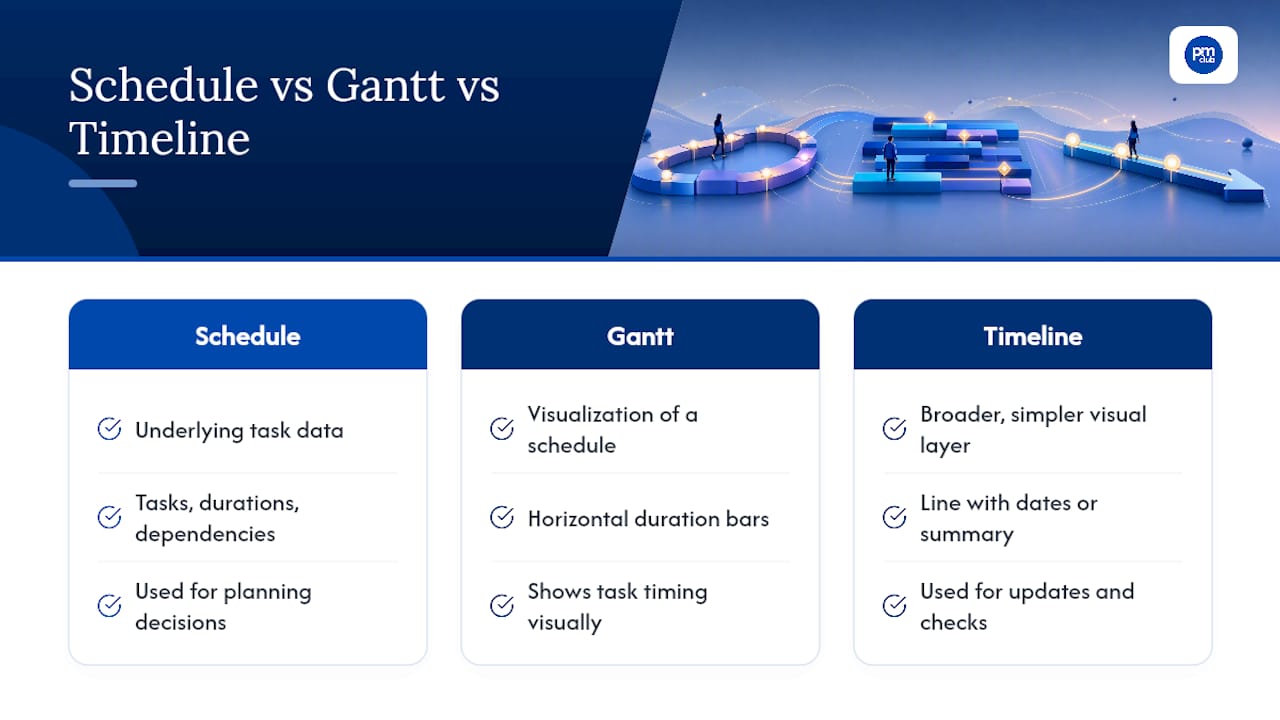
People often use "timeline," "schedule," and "Gantt chart" interchangeably, but they're not quite the same thing. A schedule is the underlying data (every task, duration, and dependency). A Gantt chart is one way to visualize that schedule as horizontal bars. A timeline is the broader, often simpler, visual layer, sometimes a Gantt, sometimes just a line with dates on it.
Core Components Every Effective Timeline Needs
Skip any of these and your timeline turns into decoration instead of a working document.
- Milestones: fixed points that mark real progress, like "contract signed" or "beta launched," not routine tasks.
- Tasks and subtasks: the actual work, broken down using a work breakdown structure so nothing slips through unnoticed.
- Task owners: one named person per task. Shared ownership usually means no ownership.
- Dependencies: which tasks must finish before others can start, so you can spot bottlenecks before they hit.
- Durations, buffers, and review points: realistic time estimates plus built-in slack for the inevitable delay.
A work breakdown structure is the piece most freelancers skip, and it's the one that saves the most pain later. Instead of writing "build website" as one task, a WBS forces you to break it into wireframes, content, development, and testing. Each of those becomes something you can actually estimate and assign, rather than a vague blob sitting on your calendar looking finished when it isn't.
Build a Timeline You Can Use Today: A Step-by-Step Process
This process works whether you're planning a two-week deliverable or a six-month client engagement.
- Define the goal and its boundary. Write a one-sentence SMART goal: specific, measurable, achievable, relevant, time-bound. If you can't state the finish line in one sentence, the scope is still too fuzzy to schedule.
- Identify deliverables and milestones. List the handful of outcomes that prove progress, then mark the dates each one needs to land.
- Build a WBS and break work into packages small enough to estimate honestly, generally a few days to a couple of weeks. This sizing guideline keeps work packages small enough to estimate honestly and track weekly.
- Estimate durations. Use your own historical data where you have it. Where you don't, apply three-point (PERT) estimating for anything uncertain.
- Map dependencies and sanity-check the critical path. Identify which chain of tasks determines your actual finish date, then look for the one delay that would blow up the whole schedule.
- Choose your visualization, assign owners, check for conflicts, then baseline and share. Once it's approved, lock a copy as your baseline so you can measure drift later.
Following a structured schedule development process rather than freehanding it in a spreadsheet cuts down on the guesswork that causes most missed deadlines.
Pro Tip: Build one explicit review or approval cycle into every milestone, not just at the end. A client who sees drafts at three checkpoints instead of one final reveal rarely asks for last-minute overhauls, because they've already shaped the direction along the way.
Which Timeline Format Fits Your Project?
The right format depends on who's looking at it and how complicated the work actually is.
- Gantt chart: best when you have multiple overlapping tasks, dependencies, and shared resources to track.
- Linear timeline: ideal for simple projects or client-facing updates where a clean left-to-right view beats a busy chart.
- Calendar view: works well for teams juggling day-by-day tasks with hard deadlines, like content calendars or event planning.
- Roadmap or milestone-only view: what executives actually want. They don't need every subtask, just the big markers and dates.
Matching the format to your audience matters more than picking the "best" tool. A simple linear timeline converts into a Gantt easily: just add duration bars and dependency lines to your existing task list. Going the other direction means stripping a Gantt down to milestones only, which usually takes less effort than building it up in the first place.
How Do You Estimate Durations Without Fooling Yourself?
Optimism is the single biggest reason timelines fall apart. Most people estimate how long a task takes them on a good day, then forget the emails, revisions, and Tuesday afternoon when nothing goes right.
Three-point estimating, or PERT, fixes this by forcing three numbers instead of one: optimistic (O), most likely (M), and pessimistic (P). The formula is:
(O + 4M + P) / 6
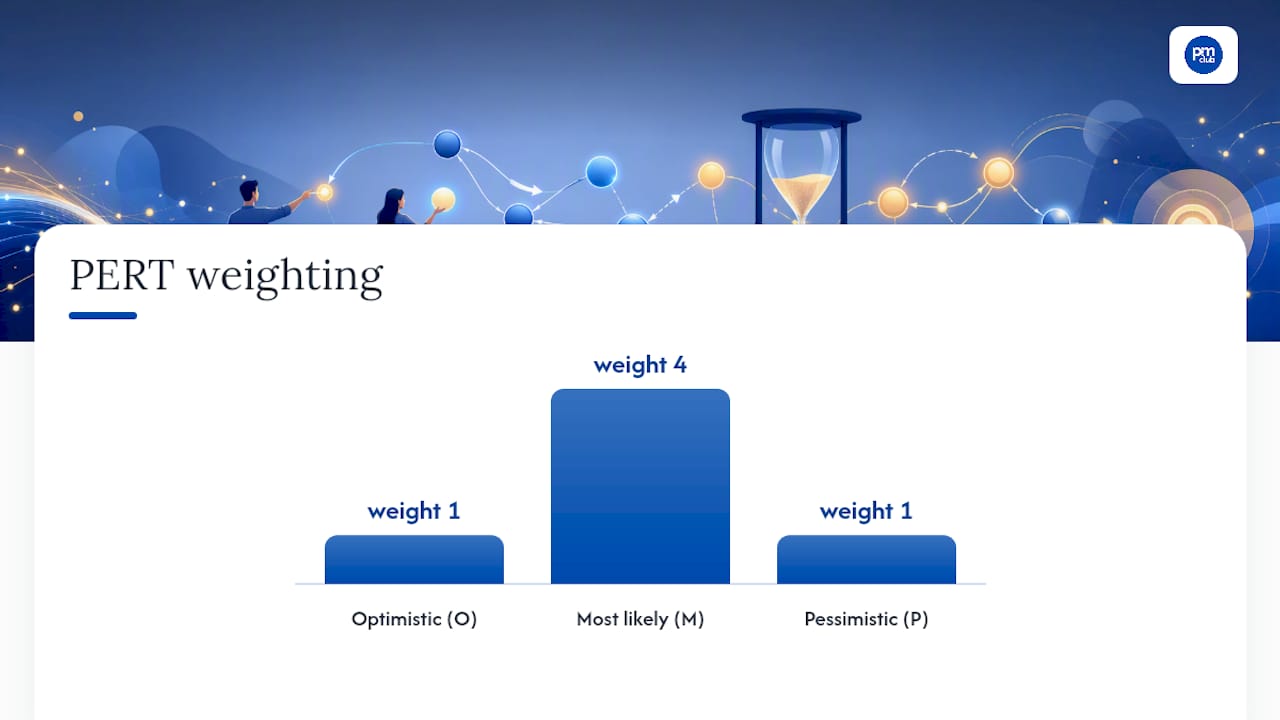
That weighted average pulls your estimate away from wishful thinking without swinging all the way to worst-case planning.
A few habits make estimates hold up under pressure:
- Keep work packages between 2 and 10 days, per standard WBS guidance, so estimates stay grounded in something you can actually picture.
- Add explicit time for collaboration, review, and feedback loops. These get forgotten more than any other line item.
- Use rolling-wave planning: detail the next two to four weeks precisely, and leave anything further out at a rougher level until it comes into focus.
- Build in contingency buffers rather than pretending every task lands exactly on schedule.
What Tools and Templates Actually Work?
You don't need specialized software to build a solid timeline. You need the right tool for your project's complexity and your audience's expectations.
- Excel or PowerPoint SmartArt: Microsoft's own SmartArt timeline guide walks through inserting a timeline graphic and adjusting dates, which works well for quick client-facing visuals.
- Excel or Google Sheets Gantt: build a basic table with start dates, durations, and owners, then apply conditional bar formatting to turn it into a Gantt chart without buying anything.
- Online timeline makers: worth the switch once you need real-time collaboration, drag-and-drop rescheduling, or shareable links for a distributed team.
- Downloadable templates: pre-built spreadsheet templates with fields for project name, dates, owners, and progress tracking save setup time, whether you need a 12-week grid, a milestone-only view, or a full project overview.
Pick the simplest tool that meets your audience's needs. A Gantt chart in a tool nobody on your team opens is worse than a shared spreadsheet everyone actually checks.
How The Freelance PM Club Supports Timeline Creation
Building a timeline from scratch every time is slow. A templates library can include downloadable timeline formats, from simple linear views to full Gantt layouts, so users can start from a working draft instead of a blank grid.
Coaching sessions can cover essential topics like sizing estimates realistically and structuring approval cycles to keep projects moving. A community layer can provide feedback from other freelance project managers with relevant experience, helping identify scope gaps early.
What I Actually Prioritize When I Build a Timeline
Three rules guide every timeline I build. First, estimate in ranges, not single numbers. Second, size work packages small enough to check weekly. Third, never skip the buffer, even under client pressure. Freelancers juggling three clients need shorter rolling waves than a single-team project would.
Pro Tip: Send a one-page milestone view before the detailed schedule. Clients approve faster when they see the big picture first.
— Ashanti
Ready-Made Templates and Coaching to Speed Things Up
Building your first few timelines from scratch teaches you a lot, but it also eats hours you could spend on billable work. A template library can offer pre-built Gantt and milestone layouts to customize, supported by coaching sessions to help stress-test estimates before client review. If approval cycles are your bottleneck, pairing your timeline process with a structured approval workflow can shave days off the back-and-forth.

Visit the The Freelance PM Club landing page to grab a template and check the schedule for the next introductory webinar. Bring your next project's milestones, and you'll walk out with a usable draft the same day.