

A repeatable, owner-assigned onboarding sequence is the single fastest lever for reducing early churn. The sequence looks like this: welcome message, intake questionnaire, document and access collection, kickoff meeting, setup and configuration, training, first-value delivery, and a formal review and handoff. Assign an owner the moment the contract is signed and send the intake form within 48 hours, not after the kickoff call.
The metric to obsess over is time-to-first-value: how many days pass between signature and the client's first real win. Firms that compress this window using a single client portal and a fast, structured document collection process tend to hold onto clients longer than firms that let onboarding drag.
- Welcome + owner assigned (Day 0)
- Intake questionnaire sent (within 48 hours)
- Documents and access collected (Days 5-12)
- Kickoff meeting (Days 3-5)
- Setup and configuration (Days 10-18)
- Training and adoption (Days 15-22)
- First value delivered (Days 20-30)
- Review and handoff (Day 30)
Target benchmark: top-performing service businesses complete core onboarding in five to seven days, while the slowest 20% lose a quarter to a third of new clients before the 90-day mark.
Key Takeaways
A repeatable, owner-assigned eight-step onboarding sequence that targets fast time-to-first-value is what separates service providers who retain clients from those who lose a quarter of them within 90 days.
| Point | Details |
|---|---|
| Assign an owner immediately | Name a responsible owner within 24 hours of signature so no client goes unattended. |
| Send intake before kickoff | Deliver the questionnaire within 48 hours and set a deadline before the kickoff meeting. |
| Track time-to-first-value | Measure days from signature to the client's first confirmed result, not just task completion. |
| Automate admin, not trust moments | Automate reminders and project creation, but keep the kickoff and 30-day review manual. |
| Use ready-made playbooks | Thefreelancepmclub provides onboarding checklists, questionnaire templates, and coaching to skip the build phase. |
Table of Contents
- What Is the Client Onboarding Process, Exactly?
- Why Does Onboarding Quality Affect Retention?
- What Are the Steps in a Client Onboarding Process?
- A Reusable Client Onboarding Checklist
- What Should a Client Onboarding Questionnaire Ask?
- Who Owns Each Phase, and How Long Should It Take?
- Which Tools Actually Speed Up Onboarding?
- Which KPIs Actually Prove Onboarding Is Working?
- What Are the Most Common Onboarding Mistakes?
- How Do You Scale Onboarding Without Losing Personalization?
- Should You Measure Tasks Completed or Outcomes Achieved?
- What I've Learned Watching Onboarding Break and Work
- Get Onboarding Templates and Coaching Built for Freelance PMs
- Frequently Asked Questions
- Sources
What Is the Client Onboarding Process, Exactly?
The client onboarding process is the structured sequence that carries a signed client from contract to their first measurable result, then hands them off cleanly to ongoing delivery. It is not the sales handoff, and it is not the same as product user onboarding. It is the operational bridge between "we agreed to work together" and "this is working."
That distinction matters because a lot of teams blur onboarding with intake. Intake is one piece: gathering the information you need. Onboarding is the whole arc, and it typically involves more than one department.
- Starts: the moment a contract or statement of work is signed.
- Ends: when the client has received a defined first result and delivery has taken over ownership.
- Involved: sales (handoff), account or project management (orchestration), delivery or implementation (execution), and sometimes a dedicated customer success role.
Picture a consulting firm that signs a client on Tuesday. If the project manager doesn't send a welcome message and questionnaire until the following Monday, the client has spent a week wondering if they made the right call. That gap is the entire onboarding period going unmanaged, and it's the most common reason engagements start on shaky footing. The structured eight-step sequence exists specifically to close that gap.
Why Does Onboarding Quality Affect Retention?
A weak onboarding period costs you more than a bad first impression. It shows up later as churn, slow renewals, and support tickets that never should have existed.
- Retention: clients who reach a real result quickly are far less likely to second-guess the engagement at renewal time.
- Fewer escalations: clear ownership and defined outputs during onboarding prevent the confused, "who do I even ask" emails that eat up account manager time for months.
- Faster expansion: clients who see fast value are the ones who ask about additional scope, not the ones asking for a refund.
- Reputation: onboarding is often the first thing a new client tells their own network about you, good or bad.
The benchmark that should worry you: the bottom 20% of service businesses lose 25 to 35% of new clients within 90 days, almost entirely because of what happened, or didn't happen, in the first month.
There's a psychological piece here that's easy to miss. Signing the contract is the client's first commitment, but it's not their only one. Every client quietly re-evaluates the decision during the first few weeks, watching for signals that they picked the right partner. Responding fast after signature, providing a single portal, and giving a clear list of next steps are the signals that settle that internal debate in your favor. Call it the second win: the sale gets you the contract, onboarding gets you the relationship.
What Are the Steps in a Client Onboarding Process?
Here's the eight-step sequence, with an owner, a deadline, and a "done" definition for each stage. Adjust the deadlines for complexity, but keep the order intact.
- Welcome message — Owner: account manager. Output: a short note confirming next steps and a portal link. Deadline: within one hour of signature. Done when: the client has replied or logged into the portal.
- Intake questionnaire sent — Owner: project manager. Output: a completed questionnaire covering goals, stakeholders, and access needs. Deadline: within 48 hours. Done when: the form is filled and reviewed internally.
- Document and access collection — Owner: implementation lead. Output: named documents and system credentials collected securely. Deadline: Days 5-12. Done when: every named item has a status of "received."
- Kickoff meeting — Owner: project manager. Output: agreed success metrics and a shared timeline. Deadline: Days 3-5. Done when: both sides can restate the same three goals.
- Setup and configuration — Owner: implementation or operations. Output: workspace, tools, and integrations live. Deadline: Days 10-18. Done when: the client can log in and see their own data.
- Training and adoption — Owner: customer success or PM. Output: the client's team can run the core workflow unsupervised. Deadline: Days 15-22. Done when: the client completes the workflow without prompting.
- First value delivery — Owner: delivery lead. Output: the first tangible result tied to the agreed metrics. Deadline: Days 20-30. Done when: the client acknowledges the result in writing.
- Review and handoff — Owner: account manager. Output: a 30-day review and formal handoff to ongoing delivery. Deadline: Day 30. Done when: the client signs off and the delivery team owns the relationship.
Two stages stall more than any other: document collection and kickoff prep. Both fail for the same reason: vague requests with no owner attached.
Pro Tip: Never use the kickoff call to gather basic intake information. Send the questionnaire beforehand and set a completion deadline before the meeting, so kickoff stays focused on decisions instead of paperwork.
Pro Tip: Name every document request to a specific person with a specific deadline instead of sending a generic list. "We need your brand guidelines" gets ignored. "Sarah, please upload your brand guidelines by Thursday" gets done.
For simple engagements, you can compress steps 3 and 5 into a single week. For enterprise clients with procurement and legal review, stretch the timeline but keep the same order. Never skip the kickoff to save time. It's the moment expectations either align or quietly diverge.
A Reusable Client Onboarding Checklist
Copy this into whatever project management tool you already use. It's organized by phase, with an owner and a target deadline for each line so nothing depends on memory.
Pre-kickoff
- Send welcome message and portal access (account manager, within 1 hour of signature).
- Deliver intake questionnaire (project manager, within 48 hours).
- Confirm stakeholder list and decision-makers (project manager, before Day 5).
Kickoff
- Schedule kickoff meeting (project manager, Days 3-5).
- Present agreed success metrics and timeline (project manager, at kickoff).
- Confirm document and access request list with named owners (implementation lead, at kickoff).
Execution and setup
- Collect signed documents and system access (implementation lead, Days 5-12).
- Complete tool and workspace configuration (operations, Days 10-18).
- Run internal QA on setup before client review (implementation lead, before Day 18).
Training and first value
- Deliver training session or materials (customer success, Days 15-22).
- Confirm client can run core workflow independently (customer success, by Day 22).
- Deliver first agreed result (delivery lead, Days 20-30).
Review and handoff
- Conduct 30-day review meeting (account manager, Day 30).
- Send handoff brief to ongoing delivery team (account manager, Day 30).
- Log lessons learned for the next client (project manager, within a week of handoff).
Store the checklist as a template inside your PM tool rather than a static document. A checklist that lives as an actual workflow with due dates and assigned owners, instead of a Google Doc nobody opens, is what actually gets enforced.
| Point | Details |
|---|---|
| Fastest completion window | Straightforward engagements can wrap core onboarding in two to three business days when the checklist is automated. |
| Phase ownership | Each phase needs one named owner, not a shared inbox or "the team." |
| Storage location | Keep the checklist inside your PM tool as a template project, not a static file. |
What Should a Client Onboarding Questionnaire Ask?
A good client onboarding questionnaire runs 10 to 15 focused questions, grouped so the client isn't guessing why you're asking. Group your fields like this:
Contact and billing
- Who is the primary point of contact for day-to-day communication?
- Who should receive invoices, and what is the preferred billing cycle?
Stakeholders
- Who are the decision-makers who need to approve deliverables?
- Are there additional team members who should be included in updates?
Goals and KPIs
- What does success look like in 30, 60, and 90 days?
- What metric will you use to judge whether this engagement worked?
Technical access
- What systems or platforms will we need access to?
- Who manages credentials, and what's the preferred method for sharing them securely?
Assets and documents
- Do you have existing brand guidelines, style guides, or prior reports we should review?
- Are there compliance or legal documents we need on file before starting?
Timelines and constraints
- Are there hard deadlines, blackout dates, or seasonal constraints we should know about?
- Who approves scope or timeline changes if they come up?
Make contact information, primary goals, and technical access mandatory. Leave secondary stakeholder details and nice-to-have documents optional. Forcing clients to fill out 20 mandatory fields before you'll schedule a kickoff is how questionnaires go unanswered for a week.
- Send the questionnaire within 48 hours of signature.
- Set a firm deadline, ideally two to three business days before the scheduled kickoff.
- Follow up once, 24 hours before the deadline, with a direct reminder.
This timing rule exists for a reason: sending the form immediately and setting a deadline before kickoff keeps that first meeting strategic instead of turning it into a data-entry session.
Who Owns Each Phase, and How Long Should It Take?
Ambiguous ownership is the single most preventable cause of stalled onboarding. Here's how responsibility typically splits across a service business, and what a realistic 30-day timeline looks like.
| Role | Core responsibility during onboarding |
|---|---|
| Sales | Closes the deal and delivers a clean handoff brief to the account manager. |
| Account manager | Owns the relationship, sends the welcome message, runs the 30-day review. |
| Project manager | Owns the questionnaire, kickoff, and overall timeline coordination. |
| Implementation lead | Owns document collection, access setup, and technical configuration. |
| Customer success | Owns training and confirms the client can run the core workflow alone. |
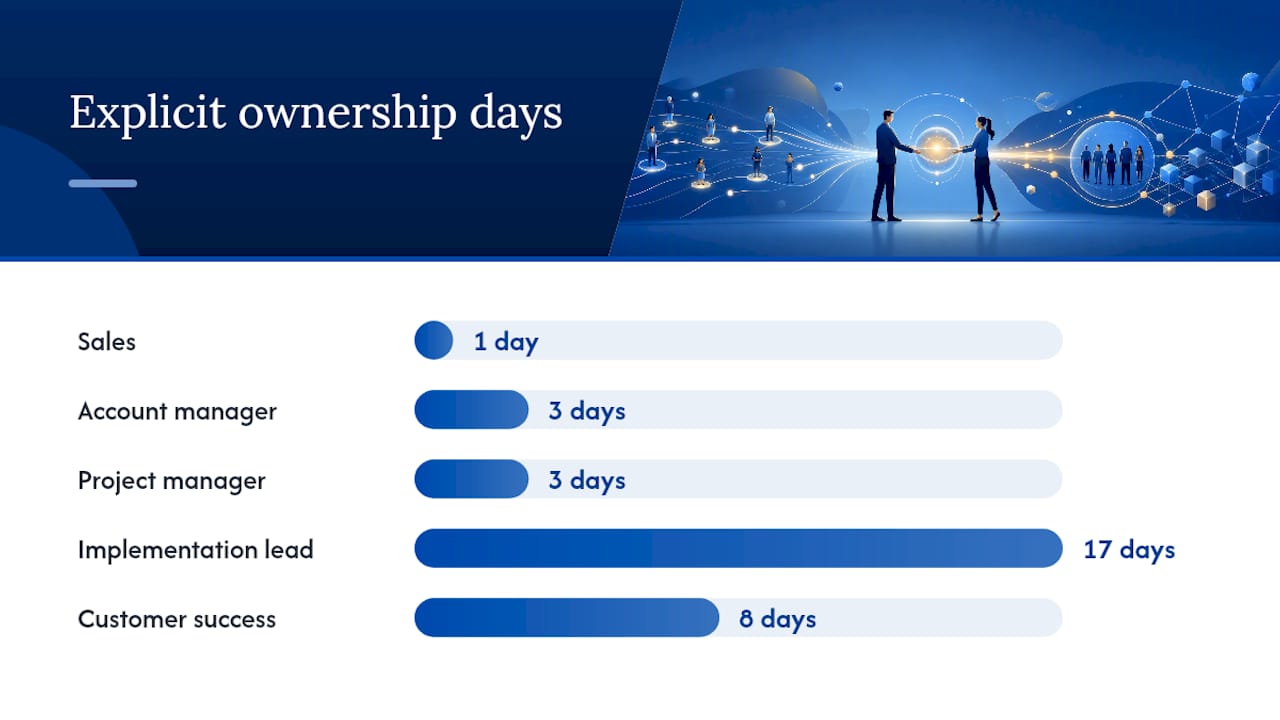
A commonly used sample timeline runs: internal handoff on Day 0, welcome and scheduling on Days 1-2, kickoff on Days 3-5, intake and documents on Days 5-12, setup and configuration on Days 10-18, training on Days 15-22, first value delivered on Days 20-30, and a review and sign-off on Day 30.
When sales hands off to delivery, include these fields in the brief so nothing gets lost in translation:
- Client's stated goals and any promises made during the sales process.
- Agreed pricing, scope boundaries, and any custom terms.
- Key stakeholder names, roles, and communication preferences.
- Red flags noted during sales (budget concerns, tight timelines, prior bad vendor experience).
Which Tools Actually Speed Up Onboarding?
The right tool stack removes friction without removing the human moments that build trust. Six categories cover almost every use case:
- Client portal: a single workspace for status, documents, and messages instead of scattered email threads.
- Intake forms: structured questionnaires that trigger automatically at signature.
- E-signature: for contracts, NDAs, and any compliance documents that need a paper trail.
- Document manager: centralized storage with named requests and visible status per file.
- Secrets manager: encrypted storage for credentials, never sent through plain email.
- PM tool: the system of record for tasks, owners, and deadlines across the whole sequence.
A few automation patterns pay for themselves almost immediately. Auto-send the intake form the moment a contract is signed. Set an automated reminder cadence for anyone who hasn't responded within 24 hours. Auto-create a project in your PM tool as soon as intake is marked complete, so nothing sits waiting for someone to notice.
Pro Tip: Never collect passwords, API keys, or financial credentials over email, even internally. Use an encrypted secrets manager or a portal with role-based access, and treat any client who insists on email as a conversation you need to have, not a workaround you accept.
A single client-facing workspace that houses intake, documents, and status in one place eliminates most of the confusion that scattered email threads cause. Whether you run a self-serve, high-touch, or hybrid onboarding flow depends on your service model and client complexity, but the underlying milestones stay the same either way.

Which KPIs Actually Prove Onboarding Is Working?
Five numbers tell you almost everything you need to know:
- Time-to-first-value: days between signature and the client's first confirmed result.
- Intake completion rate: percentage of clients who finish the questionnaire before the kickoff deadline.
- 30-day satisfaction or NPS: a quick pulse check right after the first review meeting.
- Onboarding completion rate: percentage of clients who complete every phase without dropping off.
- 90-day churn: how many onboarded clients are still active three months in.
A simple dashboard needs three data sources: your PM tool (for phase completion and deadlines), your intake form platform (for response times), and a short client survey sent at the 30-day mark. Plot time-to-first-value against complexity tier, not as one blended average, since a simple engagement and an enterprise rollout shouldn't be judged against the same clock.
Set internal targets based on your own historical data first, then benchmark against the industry. The number worth building your dashboard around: top-performing firms complete core onboarding in five to seven days, while the slowest 20% lose a quarter to a third of clients within 90 days. If your average sits closer to three weeks than one, that gap alone likely explains a chunk of your churn.
What Are the Most Common Onboarding Mistakes?
Most onboarding failures trace back to a handful of repeatable errors.
- Using the kickoff call to collect basic intake. Remedy: send the questionnaire beforehand with a deadline before the meeting.
- No named owner for the post-signature period. Remedy: assign an owner the moment the contract closes, not when the first problem appears.
- Unclear or unstated success metrics. Remedy: agree on specific, measurable goals at kickoff and write them down where both sides can see them.
- Collecting sensitive credentials over email. Remedy: move all access requests to an encrypted portal or secrets manager.
- Vague document requests sent to a general inbox. Remedy: name every request to a specific person with a specific deadline.
- Build a short checklist to prevent recurrence: owner assigned within 24 hours, intake sent within 48 hours, kickoff scheduled within five days.
- If onboarding stalls past its deadline, escalate to the account manager immediately and ask two questions: what's the blocker, and who needs to remove it?
How Do You Scale Onboarding Without Losing Personalization?
Scaling onboarding comes down to templates with parameters, not identical treatment for every client. Build a base playbook, then define complexity tiers: standard, mid-complexity, and enterprise, each with its own version of the same eight-step sequence.
- Modularity example: the welcome message and questionnaire stay the same for every tier. Document collection and setup expand for enterprise clients who need legal review or custom integrations.
- Automate: reminder emails, project creation, and status notifications. These add no relationship value, so let software handle them.
- Keep manual: the kickoff conversation, the 30-day review, and any moment where a client needs to feel heard rather than processed.
Pro Tip: Resist the urge to automate the kickoff call itself. Automation should remove admin friction, not the moments where trust actually gets built.
The goal isn't to make every client identical. It's to make the parts nobody notices, forms, reminders, status updates, invisible, so your team's attention goes to the parts clients actually remember.
Should You Measure Tasks Completed or Outcomes Achieved?
Most onboarding checklists measure the wrong thing: whether tasks got checked off, not whether the client can actually do anything with what you delivered.
Onboarding succeeds when the client can independently run their core workflow, not when every box on an internal checklist has been ticked. A completed setup form means nothing if the client still can't log in and get value without hand-holding.
That distinction changes how you design the checklist itself. Instead of "training session delivered," the line item becomes "client completed the core workflow unsupervised and confirmed it in writing." One is an activity. The other is proof.
Run this experiment on your next five onboardings: replace every task-completion checklist item with an outcome-confirmed version, then track how often the two disagree. You'll likely find cases where every task got done and the client still couldn't use the product or service independently, which is exactly the gap that quietly produces churn three months later.
Pro Tip: Add one line to your onboarding checklist: "Client has independently completed [core workflow] and confirmed it." If you can't fill that line in, the client isn't onboarded yet, no matter how many other boxes are checked.
What I've Learned Watching Onboarding Break and Work
The biggest failure I keep seeing isn't a missing step. It's a missing owner. Teams design beautiful eight-step sequences, then let the period right after signature sit in nobody's inbox for four or five days while sales moves to the next deal and delivery hasn't been briefed yet.
I watched a consulting engagement nearly collapse in its first month, not because the work was bad, but because nobody sent a single message for six days after the contract was signed. The client wasn't upset about the work. They were upset about the silence. That's the second win playing out in real time: the client isn't just watching for results, they're watching for signs that someone is paying attention.
If I could implement one thing across every service business tomorrow, it would be this: a rule that says no client goes more than 24 hours without a named human responsible for their file. Everything else, forms, tools, timelines, is easier to fix than a relationship that started with silence.
Get Onboarding Templates and Coaching Built for Freelance PMs
Building this entire system from scratch, questionnaire, checklist, kickoff agenda, timeline, takes most solo consultants weeks they don't have between client work. Thefreelancepmclub exists specifically to skip that build phase: members get ready-made onboarding checklists, questionnaire templates, and sample kickoff agendas they can adapt in an afternoon instead of building from a blank page.

Beyond the templates, members get access to coaching sessions where you can walk through your specific onboarding playbook with someone who's run this exact process across dozens of clients, plus a community where other freelance project managers and consultants review each other's approaches and flag what's missing. That combination, template plus a second pair of eyes, is usually what turns a checklist you wrote once into a system your clients actually notice. If you're ready to stop rebuilding onboarding assets for every new client, check out The Freelance PM Club and see which membership tier fits how you work.
Frequently Asked Questions
What is the client onboarding process, in one sentence? It's the structured sequence, welcome, intake, documents, kickoff, setup, training, first value, and handoff, that carries a signed client to their first measurable result.
How long should a client onboarding process take? Top-performing service businesses complete core onboarding in five to seven days, though enterprise engagements with legal review often run closer to 30 days.
What should be in a client onboarding questionnaire? Group questions into contact and billing, stakeholders, goals and KPIs, technical access, assets and documents, and timelines, aiming for 10 to 15 total questions.
Who should own the client onboarding process? Ownership shifts by phase: sales hands off, an account manager owns the relationship, a project manager runs intake and kickoff, and implementation or customer success owns setup and training.
What's the biggest mistake in consulting intake forms? Using the kickoff call to gather basic information instead of sending an intake form beforehand with a firm deadline before the meeting.
Sources
- Client Onboarding: Process, Checklist & Templates 2026
- New client onboarding done right: The process, checklist, and workflow you need | Moxo
- Client Onboarding Guide 2026: The Complete Playbook + Free Templates | OnboardMap
- Client Onboarding Process Flow: Complete Guide With 7 Steps
- The client onboarding checklist every professional services firm needs (free + interactive)