

Five things fix most freelance client chaos: an onboarding packet, a centralized client record, a weekly five-line status update, a kickoff checklist, and one shared workspace for files and approvals. The single highest-leverage habit is getting the client to acknowledge your communication norms, response windows, and revision limits before kickoff. Pair that with a pre-booked 30-day review and most of the mid-project friction freelancers dread never shows up.
TL;DR:
- A well-crafted onboarding packet with a communication norms agreement reduces scope creep and misunderstandings by establishing response windows and revision limits upfront.
- Using fixed templates for kickoff calls, weekly status updates, approval requests, and handover checklists streamlines communication and ensures consistency across projects.
- Managing five key app categories—client workspace, task tracker, shared folder, video recorder, and invoicing tool—prevents fragmentation and improves information centralization.
- Setting up processes within 48 hours, including creating templates and booking milestones, helps embed best practices from project start and avoid later retrofitting.
- Most client communication failures stem from skipping written norms approval and disorganized records; centralization and clear expectation-setting during onboarding mitigate these issues.
Table of Contents
- Client Communication Tools Start With the Right Onboarding Checklist
- What Templates Turn a Messy Project Into a Repeatable One?
- Which App Categories Do You Actually Need?
- How Do You Set This Up in Your Next 48 Hours?
- Where Freelance Communication Systems Usually Break Down
- Build This Faster With The Freelance PM Club
- Sources
- FAQ
Client Communication Tools Start With the Right Onboarding Checklist
Before you touch software, you need documents. The tools matter less than what goes into them, and a scattered onboarding process is the number one reason freelance projects go sideways in the first two weeks.
Start with a welcome packet, one page, covering who's on the project, contact info, the workspace link, and what happens next. Follow it with a project brief that lists milestones, who owns each one, and a one-line timeline nobody has to dig for. Then comes the document that prevents the most damage: a communication norms doc. This spells out your primary channel, your response window (24 business hours is a common standard), your escalation path if something's urgent, and how many rounds of revision are included. Don't just send it. Get the client to acknowledge it before kickoff. An on-record acknowledgment turns a vague expectation into something you can point back to when a client pushes past the agreed scope.
Round it out with an invoice schedule stating deposit terms and payment dates, and use onboarding to lock in a 30-day mutual review on the calendar. A compact onboarding pack with these elements reduces the repeated "wait, what's the deadline again?" messages that eat your week, according to Gatilab's onboarding research.
Your onboarding sequence, in order:
- Send the welcome packet within 24 hours of signing.
- Share the project brief with milestones and owners.
- Send the communication norms doc and request written acknowledgment.
- Confirm the invoice schedule and first deposit.
- Book the kickoff call and the 30-day review, same email.
What this replaces:
- Random check-in emails with no fixed cadence.
- A client guessing at your availability.
- Scope creep with no revision ceiling to point to.
- A first invoice dispute because nobody agreed on terms in writing.
Pro Tip: Attach the communication norms doc as a PDF the client has to open and reply "confirmed" to. A verbal agreement on a kickoff call gets forgotten. A written reply does not.
What Templates Turn a Messy Project Into a Repeatable One?
You don't need custom communication for every client. You need four templates you reuse on every single project, tweaking details, not structure.
Kickoff call, 10 minutes, agenda fixed in advance: goals, timeline, roles, and one open question for the client. Send an async prep request beforehand (three questions, answered by email) so the call doesn't turn into a 45-minute discovery session.
Weekly status, five lines, sent every Friday:
- What shipped this week.
- What's next.
- Any blockers (or "none").
- Where you stand against the milestone.
- One line on a win worth mentioning.
Replacing your ad-hoc status emails with this exact structure cuts inbox back-and-forth immediately, since the client always knows where to look for the same five answers.
Approval request, used every time you need sign-off: list exactly what's included, state the revision allowance remaining, and ask for explicit approval, not a vague "looks good." "Please confirm approval of the attached homepage design (2 of 3 revisions used) so we can move to development."
Handover checklist at project close: final files delivered, login credentials transferred, a short list of what the client owns going forward, and, ideally, a 3 to 5 minute recorded walkthrough instead of a long written document. Async video walkthroughs outperform text-heavy handover docs in actual client engagement, according to Gatilab's data on onboarding formats, because clients will watch a short video who would never finish reading three pages of instructions.
Which App Categories Do You Actually Need?
You need five categories, not fifteen apps. Overbuilding your stack is its own kind of friction.
- Client workspace: a shared doc or simple wiki page holding the brief, links, and decisions.
- Task tracker: a Kanban board or even a structured checklist, visible to the client if they want it.
- Client portal or shared folder: one place for files, contracts, and invoices, not scattered across email attachments.
- Async video recorder: for handover walkthroughs and quick explanations that save a meeting.
- Invoicing tool: automated reminders, so payment terms don't rely on you remembering to chase.
Pick based on five criteria: does it centralize information, is it easy for a non-technical client to access, does it require ongoing upkeep, does it work on mobile, and does the time saved justify the cost. A portal becomes worth the setup effort once you're managing roughly five or more active clients or juggling frequent approval cycles, since that's the point where email threads start losing files.
Specialized micro-tools, like ones that turn quick notes into a formatted client update email, can save real time when layered onto a central workspace rather than replacing it. The rule that keeps you sane: one app per job. Two task trackers or three messaging channels running in parallel is how things fall through the cracks.
How Do You Set This Up in Your Next 48 Hours?
Day 1: Build your onboarding template (welcome packet, communication norms doc, project brief). Schedule the kickoff call and, in the same email, the 30-day mutual review. This second booking matters more than it sounds. It turns a future difficult conversation into a routine calendar event instead of an ambush.
Day 2: Create the client record inside your chosen workspace. Share access, request the client's written acknowledgment of your communication norms, and set up the recurring Friday status template so it's ready before your first real update is due.
Two quick wins to bank immediately: replace your next status update with the five-line Friday format, and record one 3 to 5 minute walkthrough video for your very next deliverable instead of writing a paragraph explaining it.
Pro Tip: Do the client record first, even before the kickoff call. If you build the habit of centralizing from day one, you never have to go back and reconstruct a project history from scattered email threads later.
Where Freelance Communication Systems Usually Break Down
Most freelancers don't fail at client communication because they lack tools. They fail because they skip the boring step: getting norms agreed to, in writing, before the first deliverable goes out. I've seen the pattern enough times to call it predictable. A freelancer sets a mental expectation, "I'll respond within a day," but never says it out loud, and by week three the client is messaging at 9 p.m. expecting a reply by breakfast.
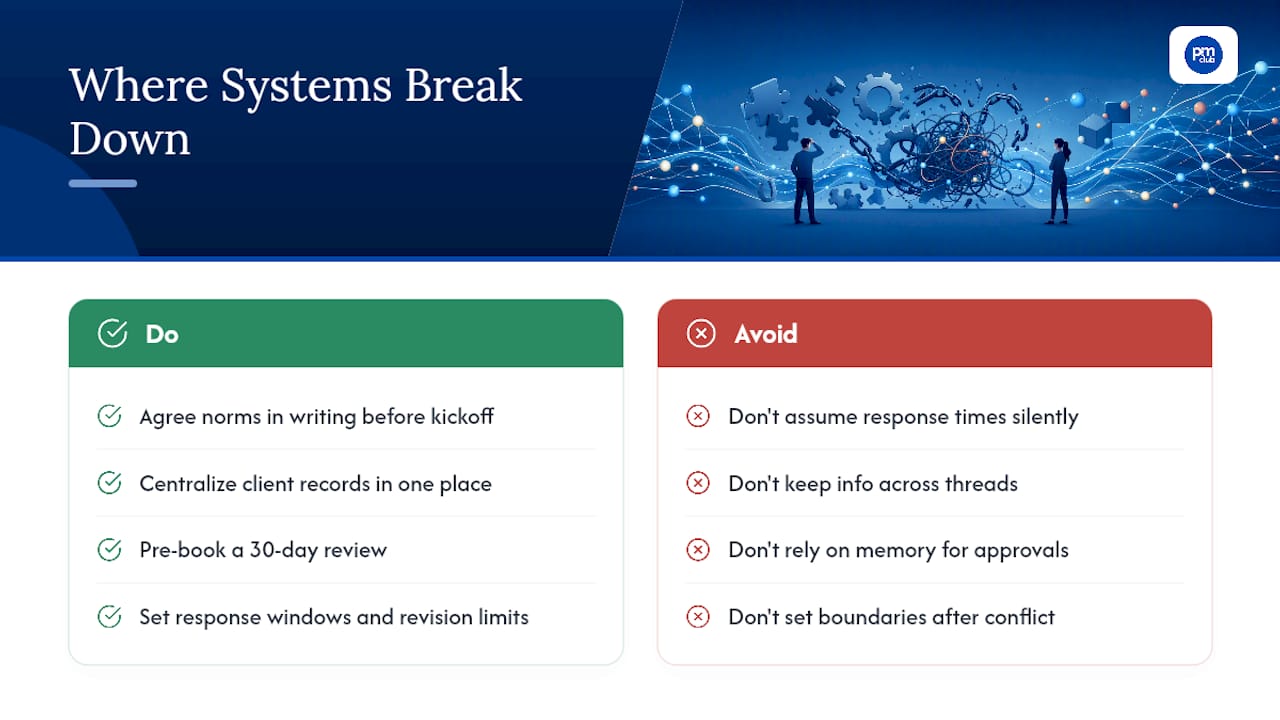
The second failure point is worse because it compounds. Client information lives in three places: an old email thread, a Slack DM, and someone's memory. When a dispute comes up about what was approved, nobody can produce the record fast enough to settle it calmly. Centralizing that history in one place isn't about looking organized. It's about having an answer ready in thirty seconds instead of twenty minutes of scrolling.
The freelancers who avoid burnout aren't the ones with the fanciest stack. They're the ones who pre-book the uncomfortable conversation, the 30-day review, before either side needs it, and who hold a firm line on response windows and revision counts. Boundaries set after a conflict feel defensive. Boundaries set during onboarding just feel professional.
— Ashanti
Build This Faster With The Freelance PM Club
Setting up onboarding checklists and status templates from scratch takes a weekend you probably don't have between client deadlines. The Freelance PM Club gives you the template library and onboarding course already built, so you're customizing instead of drafting from a blank page.
Membership includes ready-to-use onboarding checklists, communication norms templates, and career coaching to help improve your project management process. The community adds support through other freelance PMs who share their experiences with client-boundary conversations and solutions. If you're trying to implement the 48-hour plan above without reinventing every document, visit The Freelance PM Club to see current membership options.
Sources
For deeper onboarding patterns, see Plutio's client management playbook, Gatilab's onboarding retention rules, and the consulting onboarding checklist from MyConsultBase. For a broader look at agency-style client onboarding workflows, Kukoo Creative's onboarding guide is worth a read.
- Client Management for Freelancers: The 2026 Playbook
- Client Onboarding Best Practices: 12 Retention Rules - Gatilab
- BriefSend — AI Client Update Emails for Freelancers & Consultants
FAQ
What Should Go in a Client Onboarding Packet?
A welcome packet, project brief with milestones, a communication norms document requiring acknowledgment, and an invoice schedule with deposit terms. Booking the 30-day mutual review during onboarding rounds out the set.
How Often Should I Send Status Updates to Clients?
Weekly is the standard cadence, ideally a five-line Friday update covering what shipped, what's next, blockers, milestone progress, and one quick win. This replaces longer, inconsistent status emails.
When Do I Need a Full Client Portal Instead of Shared Folders?
Once you're managing roughly five or more active clients, or your projects involve frequent approval cycles, a dedicated portal starts saving more time than it costs to set up.
What's the Point of a 30-Day Mutual Review?
It turns a potential mid-project conflict into a scheduled, low-stakes conversation where both sides can flag issues or confirm the project is on track before problems compound.
Can The Freelance PM Club Help Me Set Up These Templates?
Yes. The Freelance PM Club's template library and onboarding course are built around the same checklist and communication norms structure covered in this article, alongside coaching and community support.