

A client communication plan is the governance document that maps who needs what information, when, how, and who owns delivering it. Copy the six-field matrix below into a doc, and you have a usable plan before your next kickoff call ends.
Every plan worth using answers six questions in one place:
- Audience — which stakeholder or role needs this information
- Message — what content, decision, or status they need
- Channel — email, Slack, a shared dashboard, a live call
- Cadence/trigger — a fixed schedule or an event that fires the update
- Owner — the named person responsible for sending it
- Format — a report, a summary, a live walkthrough, a one-line status
That's the whole engine. Everything else in this guide is about filling those six fields correctly and keeping them current.
Key Takeaways
A client communication plan works because it names who needs what information, assigns one owner per flow, and replaces guesswork with a documented, reviewable system.
| Point | Details |
|---|---|
| Use the six-field matrix | Audience, message, channel, cadence/trigger, owner, and format cover every gap that causes client surprises. |
| Favor triggers over fixed schedules | Event-driven updates like a budget threshold or deliverable upload cut noise better than calendar-only check-ins. |
| Name one owner per row | Diffuse ownership is the most common cause of missed updates and unrecorded scope changes. |
| Review at four checkpoints | Revisit the plan at kickoff, midpoint, milestones, and whenever the stakeholder list changes. |
| Start with The Freelance PM Club's templates | Members get a ready-to-customize one-page plan plus coaching to adapt it for new client engagements quickly. |
Table of Contents
- Why a Client Communication Plan Is a Business Necessity, Not a Meeting Calendar
- The Six Core Elements and How to Build the Communication Matrix
- How Do You Create a Communication Plan During Kickoff?
- One-Page Communication Plan Template With Three Filled Examples
- Which Channel Should You Use for Each Type of Client Message?
- Who Should Own Each Line of the Communication Plan?
- How Often Should You Review and Update the Communication Plan?
- What Real Implementation Looks Like
- How Do You Handle Cultural and Language Differences in Client Communication?
- How Should You Plan for Risk and Communication Failures?
- When Should You Bend the Rules for a High-Value Client?
- Build Your Client Communication Plan Faster With the Right Templates
- Frequently Asked Questions
- Sources
Why a Client Communication Plan Is a Business Necessity, Not a Meeting Calendar
Most client relationships don't break because of bad work. They break because someone found out about a delay, a scope change, or a budget overrun too late to react calmly. A communication plan decides whether stakeholders stay informed and aligned or become frustrated and surprised — it is the difference between a client who trusts your process and one who starts CC'ing your boss.
Treat the plan as governance, not etiquette. It belongs next to your project charter and your RAID log, not in a folder labeled "nice to have." When information flows are ad hoc, three things happen predictably:
- Decisions stall because nobody knows who needs to approve them
- Small scope changes go unrecorded until they're big, expensive surprises
- Clients fill information gaps with their own assumptions, usually the worst-case ones
Experts describe the plan as a user manual for the relationship — it replaces reactive account management with a system that catches problems before the client has to ask about them. Firms that get this right see it show up in retention: clients renew with people who make them feel informed, not people who happen to do good work quietly.
The Six Core Elements and How to Build the Communication Matrix
A project communication plan needs a list of stakeholders, the communications going to each, frequency, delivery channel, and a responsible owner. Laid out as a matrix instead of prose, gaps become visible instantly. If a row has no owner, someone will eventually claim they "thought someone else was handling it."
Here's how the six fields break down in practice:
| Field | What it captures |
|---|---|
| Audience | The specific role or person (Sponsor, Finance Contact, End User Lead), not "the client" as a blob |
| Message | The exact content: budget status, milestone approval, risk flag, weekly summary |
| Channel | Email, shared dashboard, scheduled call, async video update |
| Cadence/trigger | A fixed interval (weekly) or an event (deliverable submitted, budget threshold crossed) |
| Owner | One named person accountable for sending it, not a team |
| Format | Written report, live walkthrough, one-line Slack update, dashboard snapshot |
A sample row might read: Audience — Client Sponsor. Message — budget and timeline status. Channel — email with a link to the live dashboard. Owner — the project lead, by name. Format — a five-line written summary, not a call.
Fill this at the role level first (Sponsor, Finance Contact, Technical Lead), then attach names once the team is confirmed. Roles survive staff turnover; names alone don't.
Pro Tip: Run your draft matrix past one stakeholder from each row before you finalize it. You'll usually find at least one person who wants a different channel than you assumed, and it's far cheaper to catch that in a five-minute conversation than three weeks into the project.
How Do You Create a Communication Plan During Kickoff?
You can build a workable plan in a single kickoff session if you time-box each step. Here's the sequence that works across most client-facing projects:
- Identify stakeholders fast. List everyone who touches decisions, budget, or approvals. Don't overthink seniority; a gatekeeper assistant who controls the sponsor's calendar matters as much as a VP who rarely replies.
- Define decision points and required information. Walk through the project timeline and mark every moment someone outside your team needs to approve, review, or weigh in.
- Choose channels and write channel rules. Decide which channel is the single source of truth for status, and which channels are for quick questions only.
- Set cadence and triggers. Default to event-driven updates over calendar-driven ones wherever possible. Trigger-based communication keeps updates tied to actual progress instead of manufacturing a status update because Friday arrived.
- Assign owners and record escalation paths. Every row gets one name. If that person is unavailable, write down who steps in.
- Get stakeholder sign-off and publish. Share the one-page matrix, ask for corrections within 48 hours, then treat it as the working document for the engagement.
A few things make this sequence actually work:
- Keep the kickoff session under 45 minutes for the plan itself; longer sessions lose momentum
- Assign a review date at the same time you assign owners, so maintenance isn't an afterthought
- Publish the plan somewhere the client can see it, not just your internal wiki
One-Page Communication Plan Template With Three Filled Examples
A one-page plan with sections for stakeholder map, channel rules, triggers, ownership, and escalation gets used far more often than a fifteen-page document nobody opens after week one. The fields you need: project info, stakeholder map, the core matrix, channel rules, cadence and triggers, ownership roster, escalation path, and a small notes section for client-specific preferences.
Customizing it for a new engagement takes about 15 minutes once you have the shell. Swap in stakeholder names, adjust triggers to the project's real milestones, and confirm channel preferences with the client directly rather than assuming.
Three quick examples of how the matrix flexes by project type:
| Project Type | Primary Channel | Key Trigger | Cadence |
|---|---|---|---|
| Agency web build | Shared dashboard + weekly email | Design milestone uploaded for review | Weekly, plus on-trigger |
| Consulting retainer | Monthly written summary + quarterly call | Deliverable submitted | Monthly, plus on-request |
| Ongoing support contract | Ticketing system + escalation email | SLA breach risk | Daily status, immediate on-trigger |
When you present the plan at kickoff, walk through it live rather than emailing it cold. Ask the client to flag anything that doesn't match how they actually want to be reached. It takes five minutes and prevents weeks of channel confusion later.
Which Channel Should You Use for Each Type of Client Message?
Not every message deserves the same channel, and mixing them up is how urgent issues get buried in a weekly digest. Match the message type to the channel's actual strength.
Urgent issues (a missed dependency, a budget threshold crossed) belong in a channel that guarantees a fast read: a direct email flagged high priority, or a phone call for anything genuinely time-sensitive. Routine updates (weekly status, sprint progress) work fine in a scheduled email or a dashboard the client checks on their own time. Reference material (contracts, specs, style guides) belongs in a shared drive, never buried in a chat thread where it will get lost. Approvals need a channel that creates a paper trail: email or a project tool with a timestamp, not a verbal "yes" on a call.
Pick one channel as the single source of truth for project status, and write a channel rule that redirects anything off-channel back to it. If a client texts your project lead directly, the reply should point back to the dashboard, not start a parallel conversation thread.
Cadence should scale with project phase: heavier touchpoints during kickoff and launch, lighter during steady-state execution.
Pro Tip: Write your channel rules into the kickoff email itself, not just the matrix document. Clients read email; they don't always open the shared doc a second time.
Who Should Own Each Line of the Communication Plan?
Every row in the matrix needs exactly one named owner, not a team or a department. PMI's research on effective communication points to named ownership as one of the clearest ways to cut down on the misunderstandings that derail otherwise healthy projects. Diffuse ownership is how "I thought you sent that" conversations happen.
A simple roster format covers the roles that actually matter in client work:
- Decider — the person with authority to approve scope, budget, or timeline changes
- Point Person — the day-to-day contact who fields questions and routes them
- Beneficiary — the end user or department who receives the output, even if they don't decide
- Gatekeeper — whoever controls access to the Decider's time or attention
Escalation paths should be short enough to fit in a subject line. A workable template: "Escalation: [Project Name], budget threshold, response needed by [time]." Give escalations a real deadline, not "as soon as possible," and route them to a named backup if the primary owner doesn't respond within a set window, often four business hours for anything budget or scope related.
Ownership also ties directly to billing. If a scope change surfaces through the wrong channel and nobody owns flagging it, you lose the paper trail that justifies a change order later. For a deeper look at handling escalations without damaging the relationship, structured escalation guidance is worth a read.
How Often Should You Review and Update the Communication Plan?
A plan you never revisit turns into shelfware within a month. Schedule reviews at four natural checkpoints: kickoff, project midpoint, every major milestone, and any time the stakeholder list changes. A short, living-plan approach prevents the document from going stale far better than a thick document nobody schedules time to reopen.
Track a small set of KPIs rather than trying to measure everything:
- Acknowledgement rate — the percentage of updates that get a confirmed read or reply
- Response SLA — how long it actually takes stakeholders to respond to time-sensitive messages
- Time to decision — days between a decision request and a resolved answer
- Client feedback score — a quick pulse check, even a single question at each milestone review
Building feedback loops into the plan itself matters as much as the initial design. Ask the client directly at each milestone whether the cadence and channels are still working for them, then version the plan with a date stamp so everyone knows they're looking at the current copy, not last quarter's draft.
What Real Implementation Looks Like
Ashanti, who covers project management practice for The Freelance PM Club, has watched enough freelance PMs build these plans from scratch to know where they usually fail: not in the design, but in the follow-through.
- Freelance PMs and consultants using a one-page plan during onboarding report faster time to first billable milestone, mostly because sign-off happens in one meeting instead of an email chain
- Clearer channel rules mean fewer "quick question" texts that turn into unbilled scope creep
- Members who standardize the matrix across projects spend less time rebuilding the wheel for every new client
The pattern holds regardless of project size: a plan reviewed once and never touched again decays faster than no plan at all, because it creates false confidence.
How Do You Handle Cultural and Language Differences in Client Communication?
Global client work means your six-field matrix needs an extra layer of judgment, particularly around tone, directness, and timing. A cadence that feels appropriately frequent to a US-based client can read as excessive to a client in a culture where fewer, denser updates are the norm. Build that preference into the matrix from the start rather than discovering it after a client complains about "too much noise."

Language differences deserve the same explicit handling. If a client's team works in a second language, write shorter sentences and avoid idioms in written updates, and confirm at kickoff whether they prefer written summaries (which give them time to translate and process) over live calls (which move faster but leave less room to catch every nuance). Time zones factor in too: a trigger that fires an "immediate" escalation email at 2 a.m. their time isn't actually immediate to them, so build in a reasonable local-hours window for anything short of a genuine emergency.
The safest approach is asking directly rather than guessing. Add a line to your kickoff questionnaire: "Any preferences on communication style, timing, or format we should know about?" It takes ten seconds to ask and prevents months of unspoken friction. Document the answer in the plan's notes field so it survives even if the original project lead rotates off.
None of this requires a separate cultural playbook. It requires treating the audience field in your matrix as more than a name and a job title, and being willing to adjust cadence and format per stakeholder rather than applying one template to everyone.
How Should You Plan for Risk and Communication Failures?
Even a well-built plan needs a contingency layer for when things go wrong, because they will. Build in a fallback owner for every critical row, so a single vacation or resignation doesn't leave a client without a point of contact. If your Point Person owns client updates and goes dark for a week, the plan should already name who steps in, rather than leaving the client guessing.
Plan for channel failure too. If your single source of truth is a shared dashboard and it goes down, or the client simply stops checking it, you need a documented fallback channel, usually a direct email, that the team defaults to automatically. Write that fallback into the channel rules section instead of improvising it mid-crisis.
The highest-risk gap is usually silence during bad news. Teams that communicate well when things are going fine sometimes go quiet exactly when a client most needs an update, a delay, a budget overrun, a quality issue. Build a specific trigger for exactly this scenario: "any material risk to timeline or budget → notify Decider within 24 hours, regardless of scheduled cadence." That single rule prevents more relationship damage than almost anything else in the plan.
Finally, treat a communication breakdown itself as a risk worth logging. If a client missed three consecutive updates or a channel rule got ignored repeatedly, that's a pattern worth flagging in your RAID log, not just a one-off annoyance to shrug off.
When Should You Bend the Rules for a High-Value Client?
Rigid rules break under pressure from your best clients. If a top account wants a direct line to your lead instead of the dashboard, give it, but log the exception in the plan so it doesn't quietly become the new undocumented standard. Urgent requests still get triaged fast; they just don't get to erase governance for everyone else.
Build Your Client Communication Plan Faster With the Right Templates
You don't need to build a communication matrix from a blank page every time you land a new client. The Freelance PM Club gives freelance project managers and consultants a library of ready-made templates, including the one-page plan structure covered in this guide, so you're customizing a proven format in fifteen minutes instead of designing one from scratch under kickoff pressure.

Membership also gets you something a template alone can't: coaching from PMs who've run this matrix across dozens of client engagements, plus a community where members swap real examples of channel rules and escalation paths that actually held up under pressure. That combination, template plus practiced judgment, is what shortens the gap between reading about a communication plan and actually running one that clients notice and respect. If you're ready to stop rebuilding your governance documents from zero on every new project, check out The Freelance PM Club membership for the templates, coaching, and tools that make it repeatable.
Frequently Asked Questions
What is the difference between a communication plan and a project plan? A project plan tracks tasks, timelines, and deliverables. A communication plan tracks information flow: who needs updates, through which channel, and how often. They work together, but the communication plan focuses purely on stakeholder alignment.
How long should a client communication plan be? One page is usually enough. A one-page format with clear sections for stakeholder map, channel rules, and escalation paths gets referenced far more often than a lengthy document that sits unopened after the kickoff.
Who should own the communication plan on a client project? The project lead or account owner typically holds overall responsibility, but each row in the matrix should have its own named owner. Shared ownership across a whole team almost always leads to dropped updates.
How do you handle a client who wants updates on every channel? Set one channel as the single source of truth in your kickoff conversation and explain why: it prevents information from getting lost across five different threads. Offer a secondary channel for urgent items only, and write that rule into the plan itself.
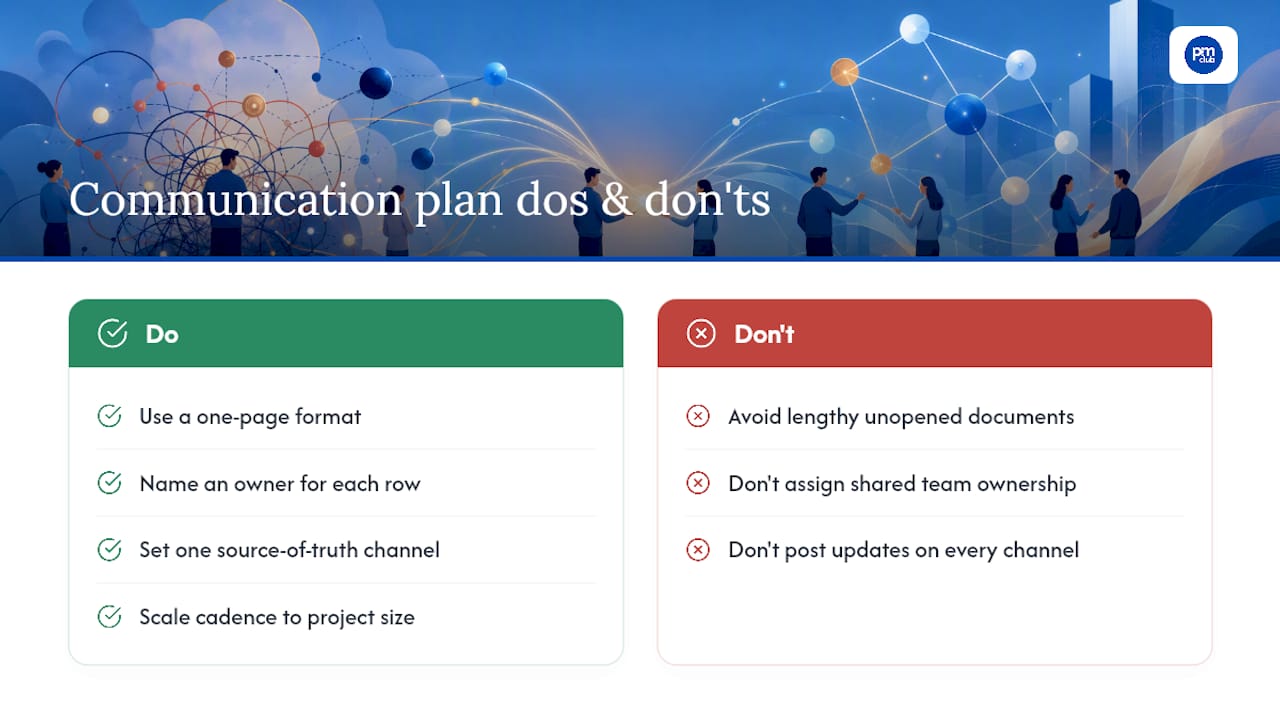
Do communication plans need to change for small projects? The structure stays the same; the frequency shrinks. A short engagement might only need weekly updates and a single milestone trigger, but the same six fields, audience, message, channel, cadence, owner, and format, still apply.
Sources
- Project Communication Plan: How to Create One (Template + Examples)
- How To Create A Project Communication Plan in 2026 + Templates
- Effective communication for better project management (PMI)
- Communication plan template: a free one-page plan that actually gets used